Category Archives: General

Bash Too Smart For Its Own Good

So I’m running the latest Ubuntu release in a virtual machine under my main Windows XP machine (it’s a blessing that I no longer need to choose between operating systems these days– I can run them all simultaneously on the same machine if I wish). Today I noticed a feature of Bash that for all I know has been in place for over a decade. I just have never seen it enabled by default in any distribution before. I had to do some research — indeed, one of the first problems in Unix is learning how to ask the right question — but I eventually figured out that the feature is called “Programmable Completion”.

Tab completion is God’s gift to command line navigation. It’s something I always take 10 seconds to carefully explain to anyone who is struggling with the Unix command line for the first time since navigating through a filesystem is agonizing without it. Programmable completion takes tab completion and tries to make it smarter. I first noticed this peculiar behavior on my Ubuntu VMware session today. If there are 2 files in the current directory, xyz.tar.gz and xyz.tar.bz2, then typing ‘tar zxvf x<TAB>’ automatically completes xyz.tar.gz while ‘tar jxvf x<TAB>’ automatically completes to xyz.tar.bz2. I noticed this, thought it was an interesting touch, thought for a moment about how it might work, and immediately wondered what would happen if the underlying mechanism isn’t aware of a mapping that I need.

It didn’t take long before I ran into that eventuality. I was trying to play some impossibly obscure formats with xine. I navigated to the necessary directories only to find that they were apparently empty of any files. I never realized just how important tab completion is to me. Now I’m reading pages of documentation trying to figure out how to disable programmable completion entirely. (It would probably be enough to ask the desktop terminal emulator to run my own Bash config files on startup– I don’t understand why I have to specifically configure such programs to do this.)

Effectively, Bash is making a decision here about what files it thinks I want to see. I’m surprised a Linux distribution would program that kind of behavior by default. How condescending is it when a Microsoft OS tells you that there are entire sets of files that you don’t need to see? Maybe that’s not a fair comparison, as the programmable completion feature is more akin to a list of file filters in a “File Open…” dialog box. Thing is, there’s no obvious way to select “show all files”.

Computer programs get into trouble when they try to anticipate what a normal user needs. More often, such programs have the effect of shaping end user behavior to account for the educated guesses that the computer makes.

Ian’s Blog

Ian Farquhar expressed surprise the other day that anyone reads his blog. So I thought I would point out that his new blog is kind of nifty. I don’t know what backend software is powering the blog, though, and I’m mistrustful of all the Javascript goings-on. The page transitions frighten me.


My Nero logo

Anyway, he likes to talk about hard multimedia-type stuff. Which is apropos since he probably works for Nero (hey Ian: an ‘About Me’ page — about you — would do wonders). So you should check it out. We niche multimedia blogs need to stick together. I hope his blog stays fresh.

Dear Nano

Dear Nano: You know I love you. You are the GPL’d heir to the old UW-Pine-derived Pico editor, my text-editing savior when I was unceremoniously thrust onto the Unix command line early in my computer science education and told to write a program.

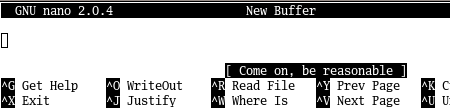
However, clever error messages may seem funny to you but are actually aggravating to the end user due to their failure to actually articulate what went wrong:


GNU Nano - Be Reasonable

This is not helpful when a user is trying to be productive and honestly has no idea what misstep just occurred. Fortunately, I have been using using GNU Nano long enough to know that “Come on, be reasonable” usually means that, rather than pressing Ctrl-W to search for text, I mistakenly pressed Ctrl-/ (go to line number) and entered a non-numeric value.

I wonder if non-English-speaking users have to put up with the same error message? Using my limited ability to interpret non-English languages, I delved into the .po files in the Nano source. Well, what do you know?

de.po:

msgid "Come on, be reasonable"
msgstr "Komm schon, sei vernünftig"

fr.po:

msgid "Come on, be reasonable"
msgstr "Allez, soyez raisonnable"

it.po:

msgid "Come on, be reasonable"
msgstr "Avanti, sii ragionevole"

This is especially egregious since “come on” is literally translated and I doubt that the idiom has the same connotation in other languages.

Thankfully, a brief perusal of the other msgid strings does not immediately reveal any other unintuitive errors. As a bonus, I just figured out that Nano must have a bracket-matching feature due the presence of such strings as “Not a bracket” and “No matching bracket”.

Multimedia Document Mirror

I started a new effort tonight: I created a mirror of multimedia-related technical documents. I found some documents on my hard drive that have no official home on the internet. Further, it is entirely possible that other documents could disappear at any time. So I am maintaining this mirror. Plus, I have tons of webspace and bandwidth to burn with my hosting plan.

The Wiki page will maintain links to both local mirrors and official links, if official links still exist. The primary Wiki page for a particular subject should link to the official link if it exists, and have a note about the local link as well.

So if you have any orphaned documents laying around that belong on this mirror, please let me know. Things such as MPEG drafts have always been fair game; final MPEG drafts — the kinds for which currency must be exchanged — are not acceptable.