Author Archives: Multimedia Mike

WordCamp 2006

I attended WordCamp 2006 today. It was free but I think part of the unwritten agreement is that attendant bloggers are required to write something about it.

WordCamp brought together a whole bunch of folks, mostly from the San Francisco Bay area, many of whom are hyper-passionate about blogging (usually with WordPress) and new media and future of communication and social networking. To be honest, a lot of it was a bit high level for my taste. I started this blog as a research journal that I decided to make public just in case someone else thought the same stuff was interesting. But the conference did remind me that I need to take the proverbial plunge and upgrade the various blogs on this site to the WordPress 2.0 series, if for no other reason than I will be able to find better themes for 2.0.

I also need to look more carefully at various plugins offered for the WordPress system. The more avid users were insistent that there is already a plugin for just about everything. This makes me want to hunt for a plugin that can automatically properly HTML-ize and colorize C code as I occasionally need to do. Further, much was made of WordPress Widgets. The end goal of all this is to let bloggers do powerful things without having to learn much, if anything, about hacking the underlying PHP/CSS/XHTML/AJAX/whatever. This is the boat I always find myself in– even though I fancy myself a reasonably technically savvy individual, normally willing to learn new techs, I simply don’t care to learn much about web programming. I just want this stuff to work. That way, I can devote more time to my specialty: figuring out how to make multimedia tech just work for Linux users.

My personal favorite presentation was about using WordPress as a general content management system (CMS). I have been wanting to do just that since WordPress is solid, easy to use, and already has a familiar ring to it. It turns out that it is feasible, though maybe with a little work, to use WP as a CMS on a site where a traditional blog layout is not the most conducive for organizing the information.

I was in the minority as a non-laptop-carrier. An inordinate number of laptop users were on Apple hardware. It’s seductive, that’s for certain. I don’t know if I saw any Linux laptops, unless they were cleverly disguised.
Minimalist UI

I was once working on a media player side project on a relatively low-power piece of hardware. Things were going quite well and I had hardware-assisted fullscreen video playing. I then hit a major wall: User interface. I could not find a suitable UI library for small embedded systems. And the last thing I wanted to spend my time doing was creating a new library.

At the time, I learned of one UI toolkit that was specifically designed for applications like embedded media players. Unfortunately, the developers’ concept of “embedded” was wildly divergent from my own as evidenced by its Boost library requirement.

I recently came across at least 2 UIs that rekindled my interest in this area: PicoGUI and Nano-X. However, based on screenshots, both appear intent upon replicating a normal desktop GUI environment on an embedded system. I guess I’m looking more for something that primarily organizes a bunch of fullscreen transparent/transluscent menus arranged in a conceptual tree hierarchy that can contain buttons, text labels, scrollable lists, and slider controls. These are the UI elements most useful for a media playback UI.

Any other ideas?

CinemaNow DVDs

Sometime last week, IMDb’s Studio Briefing notified me that there was an online service for paying for officially licensed DVD images that can be burned (just once, officially): New Movie Download Service Launches Today. The service is CinemaNow.

So, I actually decided to boot into Windows XP and try it out. First, I had to find a movie that I actually wanted. Last Wednesday night, they had 101 titles to choose from, not too many that might be termed “mainstream”. I settled on In Good Company that I saw in the theater and somewhat enjoyed. The price was $3 less than what Amazon charges, as a basic value comparison.

I thought it best to go with all the recommended software. I bit the proverbial bullet and upgraded to the beta of Windows Media Player 11, which is the first I have heard of it. I wonder what new multimedia support challenges it will cause for Linux multimedia? The experience also requires a piece of 3rd party, .NET-based software called FluxDVD.

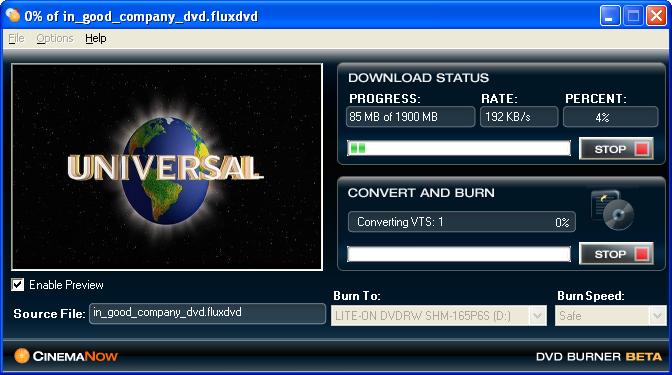
The whole thing goes fairly seemlessly and takes about 4 hours as promised:


CinemaNow FluxDVD app

The DVD plays in a standalone player as promised. I wonder if the DVD itself features the standard CSS encryption? Probably does but I haven’t checked empirically yet. The source file remains on my hard drive after download. It has a .fluxdvd extension, as seen in the screenshot, and contains some DRM-looking stuff at the front. Double-clicking launches the WMP 11 beta which performs some network activity before playing the file.

The disc image is 1.9 GB. I was wondering if the file was a Windows Media file that got converted to MPEG-2 on the fly by the above program (the “Convert and Burn” was my first clue). Colin Hill points out for me that the actual In Good Company DVD is a dual layer affair.

In other DRM news, I finally got a TV show off of iTunes. It was free. I was sorely disappointed, both with the content and the presentation. Content, because the Blade movie (at least the first one) was so awesome; but the pilot of the spinoff TV series is so bad that they have to give it away for free. Presentation, because the best that iTunes can do is display the 320-width window doublesized to 640. This doesn’t look so great on a 1280-width display. Is it really that tough to do full screen? I think not, especially if iTunes renders the video directly as YUV. I suspect that iTunes probably holds back the full screen feature for a premium version of the program, just as Apple’s QuickTime Player does.

New Filesystem Ideas

I really like FUSE, the filesystem in userspace that facilitated the creation of gcfuse. I think the killer app for FUSE is sshfs. It’s a minor miracle that if you have an SSH server running on a machine you can use sshfs to mount a filesystem from another machine. Authentication, encryption, all taken care of. None of that NFS or Samba configuration hassle.

I started wondering what else I might be able to use FUSE for. There is the small issue of Sega Dreamcast disc images. These games contain a lot of multimedia encoded with Sofdec’s middleware tools. For the most part, these discs use an ISO-9660-like filesystem that’s just a little different and doesn’t operate with Linux’s ISO-9660 module. Perhaps a FUSE/ISO-9660 module that can also handle the modified Dreamcast variant? Actually, I see that the big FUSE app directory lists an app appropriately named fuseiso which can load an ISO-9660 filesystem. It might be worth a look.

Thinking bigger, what about a FUSE module that mounts a DVD and presents it in some interesting manner? For starters, it will transparently decrypt the data. Then, present the contents of the DVD as a series of chapters or tracks or menu options. Since a DVD is not necessarily a strict hierarchy, perhaps organize the different viewing options in different directories. Or a /proc-like special filesystem that allows tinkering with the audio and subtitle options. It’s late and I’m just tossing out ideas here. Feel free to jump in.