Yearly Archives: 2008

QT And Duck FATE Tests

More new test specs tonight:

I meant to add the QT SMC and RLE tests some months ago. But in a fit of programming purity, I opted instead to log some bugs for myself to fix before I added test specs. However, I remembered that I should get as much basic functionality covered by the FATE suite first. SMC works, except in some odd resolution cases; same for QT RLE. Most of those 2 decoders’ code paths work and I want to be able to catch regressions sooner than later.

I also been tightening up some older video decoder tests. I used to have a problem when using “-f framecrc” for output where FFmpeg was outputting a huge number of identical frames at very short periods. Michael tipped me off somewhere along the line that I should use “-vsync 0” in such cases to effectively eliminate the duplicates. I still don’t understand exactly what that option does but it works splendidly.

Pickled FATE

Some people have been checking out the new test client described in the previous post. So far, most of the questions I have received concern the format of the fate-test-cache.bz2 file downloaded from the FATE server. I admire that people are taking an interest in file format particulars — as you know, I encourage that. It’s nothing too special, though. I simply have a Python script called update-test-cache.py that queries FATE’s test_spec table into an array of dictionary data structures. Then it serializes/marshals/flattens the data using Python’s built-in pickle module. It’s trivial to de-pickle on the client-side. Of course, Python’s bzip2 module helps with size concerns.

What’s the pickle format? Darned if I know, but it works famously, so I don’t really care about reinventing that wheel. Especially when the code for decompressing and deserializing boils down to these 3 lines of Python:

Also, about that rsync command I mentioned in the last post:

rsync -aL rsync://rsync.mplayerhq.hu:/samples/fate-suite/ samples

Does that actually work for anyone? Occasionally, it works for me. Most of the time, it tells me:

rsync: failed to connect to rsync.mplayerhq.hu: Can't assign requested address (49)
rsync error: error in socket IO (code 10) at /SourceCache/rsync/rsync-30/rsync/clientserver.c(94)

which, according to my searches, is a fairly generic network error (at least the bit about assigning the requested address). Since I am usually populating the sample repository manually anyway, this hasn’t been a big problem. But I am trying to be more diligent about making sure the rsync repository is up to date since I expect more people will be using it.

Anyway, FATE growth plods on with 2 new tests tonight: nsv-demux and real-14_4 (weird, I just realized that the db assigned that one ID 144 completely by coincidence).

FATE Testers Wanted

This evening, I finally got my fate-client.py script minimally ready for general consumption. fate-client.py is the unimaginatively named program I threw together some time ago to allow me to validate test specs before I activate them so that FATE will automatically test them. It works like this:

  • download the script (http://fate.multimedia.cx/fate-client.py)
  • rsync the FATE suite of samples that live on mphq: ‘rsync -aL rsync://rsync.mplayerhq.hu:/samples/fate-suite/ samples’ (without the quotes, of course) — this presently amounts to ~150 MB
  • build FFmpeg as normal
  • ‘./fate-client.py -f </path/to/ffmpeg-binary> -s </path/to/fate-suite/samples>’

That’s it. The script will ask the FATE server for a set of test specifications and run through them. You may also need to specify -l/–libpath= if you built and installed FFmpeg with shared libraries. Naturally, ‘./fate-client.py -h’ will spell out all the options.

You would do well to make sure that all the options are valid or else suffer Python bailout exceptions. I just added the command line options tonight and have not made them very resilient. I have been promising this utility for a long time and I wanted to get something out there sooner than later.

Remember that I’m still a rank amateur at Python, so don’t be afraid to call me out if I’m doing anything in the worst Pythonic way imaginable.

Ideas for future improvement:

  • Better logging– Instead of dumping to stdout, maybe dump all the results to a CSV file (for spreadsheet analysis) and/or an HTML file for easy viewing
  • Proper versioning– I track the script via a local git repository, but how do I communicate the current version? Would this be version dd394ef8f3dad056c39ab4e1c76951190621cf8b?
  • Robust error handling
  • Range testing (run all tests up to ID n, or run all tests after ID n, or from IDs m to n)
  • Skip a list of tests (for example, it would be useful to skip test #128 — the internal FFmpeg regression test — since it’s not that helpful in this particular scenario)
  • [Your idea here]

It’s open source, GPL v2, so patches welcome. Moreover, I would love to hear if this script works at all for anyone else. Then, I would like to hear how it works on platforms outside of the 3 that FATE now rigorously tests– I speak of Mac OS X, *BSD, Win32 with either MSVC or MinGW, Open/Solaris on all its various platforms, even PlayStation 3 and whatever else. I actually did get that OpenSolaris VMware session to boot after I waited long enough but I had no idea how to do anything useful with it. That’s when I decided to get down to it and get this script out there so that hopefully someone else will test those platforms.

Extra credit: Figure out why, when bailing out of the test sequence early with Ctrl-C, terminal character echo is off. I.e., the terminal refuses to print keystrokes.
Alternate Subtitles

Kostya recently lamented the matter of subtitle quality. I admit that subtitles are not a topic that I have traditionally cared very deeply about, popular though they may be in the multimedia scene. All the media I care about is generally already in English. Apparently, I’m one of the rare geeks who absolutely detests anime, so I have no reason to care about fansubs for media “imported,” one way or another, from certain Pacific islands.

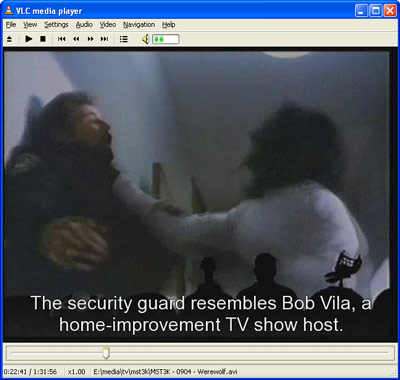
However, some time ago, I suddenly found a reason to care about subtitles. It turns out that subtitles don’t have to contain bad translations. I’m a huge fan of the old TV show Mystery Science Theater 3000 (a.k.a. MST3K). In a nutshell, the silhouettes of a guy and his 2 robot puppets make fun of rotten movies. They crack an incredibly wide variety of jokes and it’s unlikely anyone can understand every one of them. Leave it to a collaboration of internet geeks to develop an annotation project where users can submit quotes and annotations corresponding to particular timecodes in the lousy movies. These annotations go into a database where they can be downloaded as plaintext .srt subtitle files.


VLC playing MST3K 0904 (Werewolf) with subtitle annotations

“Now what we’re doin’ here, Bob, is gettin’ killed by a werewolf.”

Pictured is an annotation I added for episode 0904 – Werewolf. This is nothing new in the context of DVDs — I remember watching a popup trivia subtitle track on the Spider-Man DVD. But I’m wondering if there are other annotation projects like this one out there on the net for other niche areas of interest.