Xbox Sphinx Protocol

I’ve gone down the rabbit hole of trying to read the Xbox DVD drive from Linux. Honestly, I’m trying to remember why I even care at this point. Perhaps it’s just my metagame of trying to understand how games and related technologies operate. In my last post of the matter, I determined that it is possible to hook an Xbox drive up to a PC using a standard 40-pin IDE interface and read data sectors. However, I learned that just because the Xbox optical drive is reading an Xbox disc, that doesn’t mean it’s just going to read the sectors in response to a host request.

Oh goodness, no. The drive is going to make the host work for those sectors.

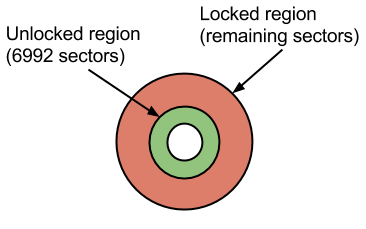
To help understand the concept of locked/unlocked sectors on an Xbox disc, I offer this simplistic diagram:


Xbox locked disc diagram

Any DVD drive (including the Xbox drive) is free to read those first 6992 sectors (about 14 MB of data) which just contain a short DVD video asking the user to insert the disc into a proper Xbox console. Reading the remaining sectors involves performing a sequence of SCSI commands that I have taken to calling the “Sphinx Protocol” for reasons I will explain later in this post.

References
Doing a little Googling after my last post on the matter produced this site hosting deep, technical Xbox information. It even has a page about exactly what I am trying to achieve: Use an Xbox DVD Drive in Your PC. The page provides a tool named dvdunlocker written by “The Specialist” to perform the necessary unlocking. The archive includes a compiled Windows binary as well as its source code. The source code is written in Delphi Pascal and leverages Windows SCSI APIs. Still, it is well commented and provides a roadmap, which I will try to describe in this post.

Sphinx Protocol
Here is a rough flowchart of the steps that are (probably) involved in the unlocking of those remaining sectors. I reverse engineered this based on the Pascal tool described in the previous section. Disclaimer: at the time of this writing, I haven’t tested all of the steps due to some Linux kernel problems, described later.

Continue reading

Interfacing to an Xbox Optical Drive

The next generation Xbox is going to hit the streets soon. But for some reason, I’m still interested in the previous generation’s unit (i.e., the original Xbox). Specifically, I’ve always wondered if it’s possible to use the original Xbox’s optical drive in order to read Xbox discs from Linux. I was never curious enough to actually buy an Xbox just to find out but I eventually came across a cast-off console on a recycle pile.

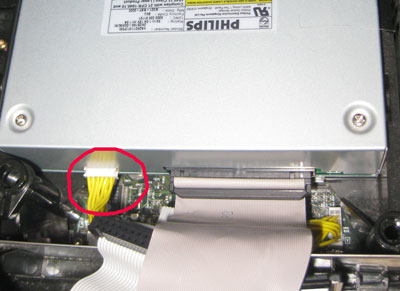
I have long known that the Xbox has what appears to be a more or less standard optical drive with a 40-pin IDE connector. The only difference is the power adapter which I surmise is probably the easiest way to turn a bit of standardized hardware into a bit of proprietary hardware. The IDE and power connectors look like this:


Xbox optical drive connections

Thus, I wanted to try opening an Xbox and plugging the optical drive into a regular PC, albeit one that supports IDE cables, and allow the Xbox to supply power to the drive. Do you still have hardware laying around that has 40-pin IDE connectors? I guess my Mac Mini PPC fits the bill, but I’ll be darned if I’m going to pry that thing open again. I have another IDE-capable machine buried in my closet, last called into service when I needed a computer with a native RS-232 port 3 years ago. The ordeal surrounding making this old computer useful right now can be another post entirely.

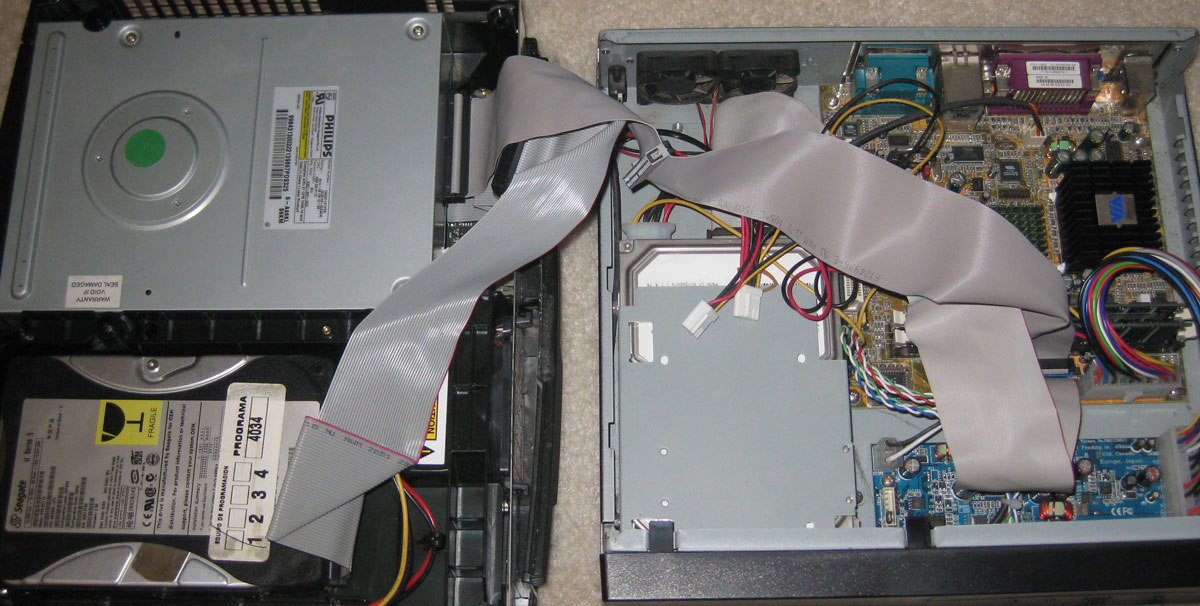
Here’s what the monstrosity looks like thanks to characteristically short IDE cable lengths:


Xbox optical drive connected directly to PC

Click for larger image


Process:

  1. Turn on Xbox first
  2. Turn on PC

Doing these things in the opposite order won’t work since the kernel really wants to see the drive when booting up. Inspecting the 'dmesg' log afterward reveals interesting items:

hdd: PHILIPS XBOX DVD DRIVE, ATAPI CD/DVD-ROM drive
hdd: host max PIO5 wanted PIO255(auto-tune) selected PIO4
hdd: UDMA/33 mode selected
[...]
hdd: ATAPI DVD-ROM drive, 128kB Cache

Why is that interesting? When is the last time to saw disk devices prefixed by ‘hd’ rather than ‘sd’? Blast from the past. Oh, and the optical drive’s vendor string clearly indicates that this is an Xbox drive saying ‘hi!’.

Time To Read
When I first studied an Xbox disc in a normal optical drive, I noticed that I was able to read 6992 2048-byte sectors — about 14 MB of data — as reported by the disc table of contents (TOC). This is just enough data to play a standard DVD video animation that kindly instructs the viewer to please use a proper Xbox. At this point, I estimated that there must be something special about Xbox optical drive firmware that knows how to read alternate information on these discs and access further sectors.

I ran my TOC query tool with an Xbox Magazine demo disc in the optical drive and it reported substantially more than 6992 sectors, enough to account for more than 2 GB of data. That’s promising. I then tried running 'dd' against the device and it was able to read… about 14 MB, an exact quantity of bytes that, when divided by 2048 bytes/sector, yields 6992 sectors.

Future (Past?) Work
Assuming Google is your primary window into the broader internet, the world is beginning to lose its memory of things pertaining to the original Xbox (Microsoft’s naming scheme certainly doesn’t help searches). What I’m saying is that it can be difficult to find information about this stuff now. However, I was able to learn that a host needs to perform a sort of cryptographic handshake with the drive at the SCSI level before it is allowed to access the forbidden areas of the disc. I think. I’m still investigating this and will hopefully post more soon.

Game Music Appreciation, One Year Later

I released my game music website last year about this time. It was a good start and had potential to grow in a lot of directions. But I’m a bit disappointed that I haven’t evolved it as quickly as I would like to. I have made a few improvements, like adjusting the play lengths of many metadata-less songs and revising the original atrocious design of the website using something called Twitter Bootstrap (and, wow, once you know what Bootstrap is, you start noticing it everywhere on the modern web). However, here are a few of the challenges that have slowed me down over the year:

Problems With Native Client – Build System
The technology which enables this project — Google’s Native Client (NaCl) — can be troublesome. One of my key frustrations with the environment is that every single revision of the NaCl SDK seems to adopt a completely new build system layout. If you want to port your NaCl project forward to newer revisions, you have to spend time wrapping your head around whatever the favored build system is. When I first investigated NaCl, I think it was using vanilla GNU Make. Then it switched to SCons. Then I forgot about NaCl for about a year and when I came back, the SDK had reverted back to GNU Make. While that has been consistent, the layout of the SDK sometimes changes and a different example Makefile shows the way.

The very latest version of the API has required me to really overhaul the Makefile and to truly understand the zen of Makefile programming. I’m even starting to grasp the relationship it has to functional programming.

Problems With Native Client – API Versions and Chrome Bugs
I built the original Salty Game Music Player when NaCl API version 16 was current. By the time I published the v16 version, v19 was available. I made the effort to port forward (a few APIs had superfically changed, nothing too dramatic). However, when I would experiment with this new player, I would see intermittent problems on my Windows 7 desktop. Because of this, I was hesitant to make a new player release.

Around the end of May, I started getting bug reports from site users that their Chrome browsers weren’t allowing them to activate the Salty Game Music Player — the upshot was that they couldn’t play music unless they manually flipped a setting in their browser configuration. It turns out that Chrome 27 introduced a bug that caused this problem. Not only that, but my player was one of only 2 known NaCl apps that used the problematic feature (the other was developed by the Google engineer who entered the bug).

After feeling negligent for a long while about not doing anything to fix the bug, I made a concerted and creative effort to work around the bug and pushed out a new version of the player (based on API v25). My effort didn’t work and I had to roll it back somewhat (but still using the new player binaries). The bug was something that I couldn’t work around. However, at about the same time that I was attempting to do this, Google was rolling out Chrome 28 which fixed the bug, rendering my worry and effort moot.

Problems With Native Client – Still Not In The Clear
I felt reasonably secure about releasing the updated player since I couldn’t make my aforementioned problem occur on my Windows 7 setup anymore. I actually have a written test plan for this player, believe it or not. However, I quickly started receiving new bug reports from Windows users. Mostly, these are Windows 8 users. The player basically doesn’t work at all for them now. One user reports the problem on Windows 7 (and another on Windows 2008 Server, I think). But I can’t see it.

I have a theory about what might be going wrong, but of course I’ll need to test it, and determine how to fix it.

Database Difficulties
The player is only half of the site; the other half is the organization of music files. Working on this project has repeatedly reminded me of my fundamental lack of skill concerning databases. I have a ‘production’ database– now I’m afraid to do anything with it for fear of messing it up. It’s an an SQLite3 database, so it’s easy to make backups and to create a copy in order to test and debug a new script. Still, I feel like I’m missing an entire career path worth of database best practices.

There is also the matter of ongoing database maintenance. There are graphical frontends for SQLite3 which make casual updates easier and obviate the need for anything more sophisticated (like a custom web app). However, I have a slightly more complicated database entry task that I fear will require, well, a custom web app in order to smoothly process hundreds, if not thousands of new song files (which have quirks which prohibit the easy mass processing I have been able to get away with so far).

Going Forward
I remain hopeful that I’ll gradually overcome these difficulties. I still love this project and I have received nothing but positive feedback over the past year (modulo the assorted recommendations that I port the entire player to pure JavaScript).

You would think I would learn a lesson about building anything on top of a Google platform in the future, especially Native Client. Despite all this, I have another NaCl project planned.

Managing Music Playback Channels

My Game Music Appreciation site allows users to interact with old video game music by toggling various channels, as long as the underlying synthesizer engine supports it.
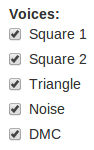

5 NES voices

Users often find their way to the Nintendo DS section pretty quickly. This is when they notice an obnoxious quirk with the channel toggling feature: specifically, one channel doesn’t seem to map to a particular instrument or track.

When it comes to computer music playback methodologies, I have long observed that there are 2 general strategies: Fixed channel and dynamic channel allocation.

Fixed Channel Approach
One of my primary sources of computer-based entertainment used to be watching music. Sure I listened to it as well. But for things like Amiga MOD files and related tracker formats, there was a rich ecosystem of fun music playback programs that visualized the music. There exist music visualization modes in various music players these days (such as iTunes and Windows Media Player), but those largely just show you a single wave form. These files were real time syntheses based on multiple audio channels and usually showed some form of analysis for each channel. My personal favorite was Cubic Player:
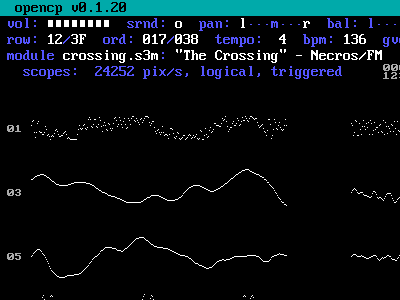

Open Cubic Player -- oscilloscopes

Most of these players supported the concept of masking individual channels. In doing so, the user could isolate, study, and enjoy different components of the song. For many 4-channel Amiga MOD files, I observed that the common arrangement was to use the 4 channels for beat (percussion track), bass line, chords, and melody. Thus, it was easy to just listen to, e.g., the bass line in isolation.

MODs and similar formats specified precisely which digital audio sample to play at what time and on which specific audio channel. To view the internals of one of these formats, one gets the impression that they contain an extremely computer-centric view of music.

Dynamic Channel Allocation Algorithm
MODs et al. enjoyed a lot of popularity, but the standard for computer music is MIDI. While MOD and friends took a computer-centric view of music, MIDI takes, well, a music-centric view of music.

There are MIDI visualization programs as well. The one that came with my Gravis Ultrasound was called PLAYMIDI.EXE. It looked like this…
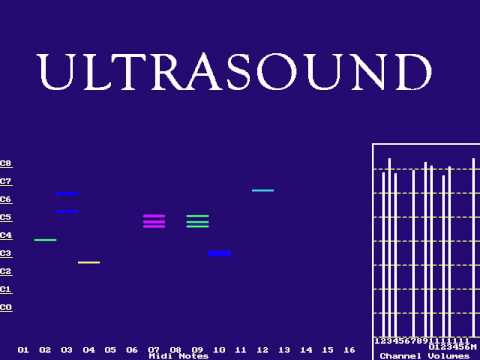

Gravis Ultrasound PLAYMIDI.EXE application

… and it confused me. There are 16 distinct channels being visualized but some channels are shown playing multiple notes. When I dug into the technical details, I learned that MIDI just specifies what notes need to be played, at what times and frequencies and using which instrument samples, and it was the MIDI playback program’s job to make it happen.

Thus, if a MIDI file specifies that track 1 should play a C major chord consisting of notes C, E, and G, it would transmit events “key-on C; delta time 0; key-on E; delta time 0; key-on G; delta time …; [other commands]”. If the playback program has access to multiple channels (say, up to 32, in the case of the GUS), the intuitive approach would be to maintain a pool of all available channels. Then, when it’s time to process the “key-on C” event, fetch the first available channel from the pool, mark it as in-use, play C on the channel, and return that channel to the pool when either the sample runs its course or the corresponding “key-off C” event is encountered in the MIDI command stream.

About That Game Music
Circling back around to my game music website, numerous supported systems use the fixed channel approach for playback while others use dynamic channel allocation approach, including evey Nintendo DS game I have so far analyzed.

Which approach is better? As in many technical matters, there are trade-offs either way. For many systems, the fixed channel approach is necessary because for many older audio synthesis systems, different channels had very specific purposes. The 8-bit NES had 5 channels: 2 square wave generators (used musically for melody/treble), 1 triangle wave generator (usually used for bass line), a noise generator (subverted for all manner of percussive sounds), and a limited digital channel (was sometimes assigned richer percussive sounds). Dynamic channel allocation wouldn’t work here.

But the dynamic approach works great on hardware with 16 digital channels available like, for example, the Nintendo DS. Digital channels are very general-purpose. What about the SNES, with its 8 digital channels? Either approach could work. In practice, most games used a fixed channel approach: Games might use 4-6 channels for music while reserving the remainder for various in-game sound effects. Some notable exceptions to this pattern were David Wise’s compositions for Rare’s SNES games (think Battletoads and the various Donkey Kong Country titles). These clearly use some dynamic channel approach since masking all but one channel will give you a variety of instrument sounds.

Epilogue
There! That took a long time to explain but I find it fascinating for some reason. I need to distill it down to far fewer words because I want to make it a FAQ on my website for “Why can’t I isolate specific tracks for Nintendo DS games?”

Actually, perhaps I should remove the ability to toggle Nintendo DS channels in the first place. Here’s a funny tale of needless work: I found the Vio2sf engine for synthesizing Nintendo DS music and incorporated it into the program. It didn’t support toggling of individual channels so I figured out a way to add that feature to the engine. And then I noticed that most Nintendo DS games render that feature moot. After I released the webapp, I learned that I was out of date on the Vio2sf engine. The final insult was that the latest version already supports channel toggling. So I did the work for nothing. But then again, since I want to remove that feature from the UI, doubly so.