The Fastest Way To Learn Assembly Language

I saw an old StackOverflow thread linked from Hacker News asking how to whether it’s worthwhile to learn assembly language and how to go about doing so. I’d like to take a stab at the last question.

The fastest way to learn an assembly language is to reverse engineer something. Seriously, start with something that you know (like a C program that you wrote yourself) and take it apart. The good news is that assembly language is very simple and you will get a lot of practice in a short amount of time with RE.

So here’s how you do it:

  • Take a simple program in C and build it with your tool chain, whether GNU gcc on Linux, Xcode on Mac, or MSVC on Windows. Also, make sure to turn on debugging symbols during compilation (this will help annotate the disassembly).
  • On Linux, use objdump: objdump -d program_binary
  • On Mac, use otool: otool -tV program_binary
  • On Windows: I admit, I’m a bit fuzzy on this one– I’m quite certain there’s a standard MSVC tool that prints the assembly listing.

Anyway, look at the disassembled code and find the main() function. Work from there. Whatever the first instruction is, look it up on Google. You’ll likely find various CPU manuals that will explain the simple operation of the instruction. Look up the next unfamiliar instruction, then the next. Trust me, you’ll become an ASM expert in no time.

Good luck!

Physical Calculus Education

I have never claimed to be especially proficient at math. I did take Advanced Placement calculus in my senior year of high school. While digging through some boxes, I found an old grade report from that high school year. I wondered what motivated me to save it. Maybe it’s because it offered this clue as to why I can’t perform adequately in math class:


Mystery solved: I did not wear proper P.E. attire to calculus class.

Further SMC Encoding Work

Sometimes, when I don’t feel like doing anything else, I look at that Apple SMC video encoder again.

8-bit Encoding
When I last worked on the encoder, I couldn’t get the 8-color mode working correctly, even though the similar 2- and 4-color modes were working fine. I chalked the problem up to the extreme weirdness in the packing method unique to the 8-color mode. Remarkably, I had that logic correct the first time around. The real problem turned out to be with the 8-color cache and it was due to the vagaries of 64-bit math in C. Bit shifting an unsigned 8-bit quantity implicitly results in a signed 32-bit quantity, or so I discovered.

Anyway, the 8-color encoding works correctly, thus shaving a few more bytes off the encoding size.

Encoding Scheme Oddities
The next step is to encode runs of data. This is where I noticed some algorithmic oddities in the scheme that I never really noticed before. There are 1-, 2-, 4-, 8-, and 16-color modes. Each mode allows encoding from 1-256 blocks of that same encoding. For example, the byte sequence:

  0x62 0x45

Specifies that the next 3 4×4 blocks are encoded with single-color mode (of byte 0x62, high nibble is encoding mode and low nibble is count-1 blocks) and the palette color to be used is 0x45. Further, opcode 0x70 is the same except the following byte allows for specifying more than 16 (i.e., up to 256) blocks shall be encoded in the same matter. In light of this repeat functionality being built into the rendering opcodes, I’m puzzled by the existence of the repeat block opcodes. There are opcodes to repeat the prior block up to 256 times, and there are opcodes to repeat the prior pair of blocks up to 256 times.

So my quandary is: What would the repeat opcodes be used for? I hacked the FFmpeg / Libav SMC decoder to output a histogram of which opcodes are used. The repeat pair opcodes are never seen. However, the single-repeat opcodes are used a few times.

Puzzle Solved?
I’m glad I wrote this post. Just as I was about to hit “Publish”, I think I figured it out. I haven’t mentioned the skip opcodes yet– there are opcodes that specify that 1-256 4×4 blocks are unchanged from the previous frame. Conceivably, a block could be unchanged from the previous frame and then repeated 1-256 times from there.

That’s something I hadn’t thought of up to this point for my proposed algorithm and will require a little more work.

Further reading

Basic Video Palette Conversion

How do you take a 24-bit RGB image and convert it to an 8-bit paletted image for the purpose of compression using a codec that requires 8-bit input images? Seems simple enough and that’s what I’m tackling in this post.

Ask FFmpeg/Libav To Do It
Ideally, FFmpeg / Libav should be able to handle this automatically. Indeed, FFmpeg used to be able to, at least at the time I wrote this post about ZMBV and was unhappy with FFmpeg’s default results. Somewhere along the line, FFmpeg and Libav lost the ability to do this. I suspect it got removed during some swscale refactoring.

Still, there’s no telling if the old system would have computed palettes correctly for QuickTime files.

Distance Approach
When I started writing my SMC video encoder, I needed to convert RGB (from PNG files) to PAL8 colorspace. The path of least resistance was to match the pixels in the input image to the default 256-color palette that QuickTime assumes (and is hardcoded into FFmpeg/Libav).

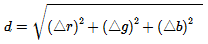
How to perform the matching? Find the palette entry that is closest to a given input pixel, where “closest” is the minimum distance as computed by the usual distance formula (square root of the sum of the squares of the diffs of all the components).


That means for each pixel in an image, check the pixel against 256 palette entries (early termination is possible if an acceptable threshold is met). As you might imagine, this can be a bit time-consuming. I wondered about a faster approach…

Lookup Table
Continue reading