Author Archives: Multimedia Mike

More Non-x86 Subnotebook News

Maybe it’s almost time for cheap, non-x86, subnotebooks to hit the mainstream. I just read about the ARM-based Pegatron at Endgadget. I wager this won’t be as difficult to compile software for as the MIPS subnotebook is turning out to be.

Meanwhile, those Gdium people recently announced a program that they affectionately refer to as One Laptop Per Hacker (OLPH). The idea is to allow interested hackers to obtain pre-release access to Gdium units. I signed up for the program but never bothered to announce it here; hey, anything to reduce potential competition.

Anyway, I got an email tonight notifying me that I am accepted into the program. I’m getting cold feet, though, especially over the legal agreement I am expected to sign in order to procure the pre-release unit. If I wasn’t already in possession of my other MIPS subnotebook, I would jump right on top of this.

OTOH, this unit will undoubtedly be easier to develop for, since it’s partially designed for that purpose. Plus, it’s 64-bit (though I don’t know if that really means anything in the grand scheme of MIPS chips).

What do you think? Should I go for it, for the sake of FATE and the greater FFmpeg project?
Special QuickTime Features

I processed some more unknown samples today, the ones that came from last month’s big Picsearch score. I found some interesting QuickTime specimens. One of them was filed under video codec FourCC ‘fire’. The sample only contained one frame of type fire and that frame was very small (238 bytes) and looked to contain a number of small sub-atoms. Since the sample had a .mov extension, I decided to check it out in Apple’s QuickTime Player. It played fine, and you can see the result on the new fire page I made in the MultimediaWiki. Apparently, it’s built into QuickTime. The file also features a single frame of RPZA video data. My guess is that the logo on display is encoded with RPZA while the fire block defines parameters for a fire animation.

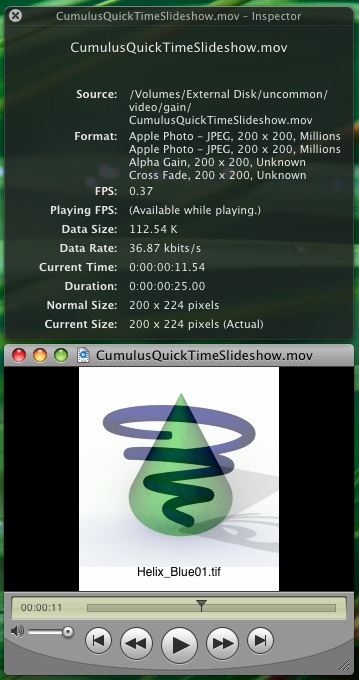
Moving right along, I got to another set of QuickTime samples that were filed under ‘gain’ video codec. This appears to be another meta-codec and this is what it looks like in action:


Apple QuickTime Player using the gain/fade feature

I decided to post this pretty screenshot here since I didn’t feel like creating another Wiki page for what I perceive to be not a “real” video codec. The foregoing CumulusQuickTimeSlideshow.mov sample comes from here and actually contains 5 separate trak atoms: 2 define ‘jpeg’ data, 1 is ‘gain’, 1 is ‘dslv’ and the last is ‘text’, which defines ASCII strings containing the filenames on the bottom of the slideshow. I have no idea what the dslv atom is for, but something, somewhere in the file defines whether this so-called alpha gain effect will use a cross fade (as seen with the Cumulus shapes) or if it will use an Iris transitional effect (as seen in the sample na_visit03.mov here).

So much about the QuickTime format remains a mystery.

Bring Me Tests

People often ask me how they can help with this whole FATE effort. There is one very clear item I could use help on: More tests. You can help me fill in the holes in FATE’s test coverage. For those who are interested:

  • Check over the FATE Test Coverage wiki page
  • Find red boxes
  • Think of a method involving the ‘ffmpeg’ command line tool that exercise the feature in that box, something along the lines of “ffmpeg -i sample.file -f framecrc -“, and preferably something that is expected to be bit-exact across platforms
  • Tell me about the test, and where to locate the relevant sample file

My ad-hoc — but not hard and fast — rule about FATE suite samples is that I try to keep them under 2 MB. Exceptions can be made, but I often carve up samples manually, either with dd, or by remuxing, or using both methods.

If you have any concrete test spec ideas, please let me know, either through the comments or through email (on the sidebar). Remember, bit-exact tests are necessary at this point, although I hope to have a workable idea for testing non-bit-exact formats soon.

Adventures In MIPS Tools

I’m trying to compile a program that will run on my new MIPS-based subnotebook. I finally got a cross-compiling toolchain built and building a super-simple C program. But the program failed to run. When I tried to run my sample program, the shell complained about not knowing what to do with a ‘(‘ character. Puzzling.

This is the ‘file’ type of my compiled program:

ELF 32-bit MSB executable, MIPS, MIPS-I version 1 (SYSV), statically linked, not stripped

I finally thought to extract a binary from the MIPS machine and check its file type:

ELF 32-bit LSB executable, MIPS, version 1 (SYSV), dynamically linked (uses shared libs), stripped

Okay, I think I’m getting wise to the discrepancy already. It turns out that I want a target called “mipsel” rather than just plain “mips” as the former specifies little endian (and because a MIPS CPU can be wired to run either endian — that’s how simple and reduced this reduced instruction set is).

So I rebuilt the toolchain using the ‘mipsel’ target (building the toolchain is surprisingly quick when you know how). Now the test program segfaults when I try to run it. That’s unfortunate, though I still perceive it to be a step up from the last position. This is the new type reported by ‘file’:

ELF 32-bit LSB executable, MIPS, MIPS-I version 1 (SYSV), statically linked, not stripped

It’s MIPS-I version 1, vs. simply MIPS version 1, which is what the existing binaries are. I wonder if that’s the problem? I’m also struggling with a linker warning about the start location. That’s more likely to be the issue.

BTW, this is the C code I am testing with:

int main()
{
  return 77;
}

My thinking here is that I should be able to run the program followed by “echo $?” to get the last command’s exit status– 77 in this case.