Author Archives: Multimedia Mike

Last Performance Smackdown For Awhile

This is getting arduous. I think this will be my last performance smackdown for awhile. First off, I put the latest in the icc 10.1 series — 10.1.022 — into FATE for both x86_32 and x86_64. It seems to work quite well with the 32-bit version having a little trouble with the regression suite; 64-bit version passes all of our tests.

For this test, I decided to use a much shorter video. The file in question has ~10700 frames of MPEG-4 part 2 video at 704×400, along with MP3 audio. The x86_32 performance trend shapes up precisely as we have seen in previous tests, and with a file that takes 1/10 the time to decode. FFmpeg SVN revision is 18737.
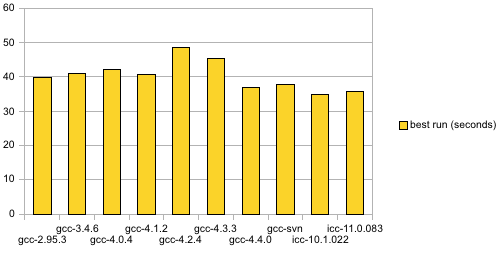

32-bit performance comparison, 2009-05-04

As usual, all handcrafted ASM optimizations are disabled. The x86_32 configurations were built with –march/–cpu equal to core2 where available, else pentium4 where available.

Here is the 64-bit chart. It must be noted that FFmpeg compiled with 11.0.083 did not decode the file correctly.
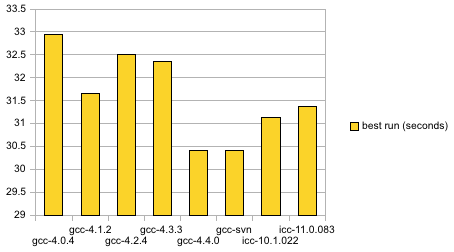

64-bit performance comparison, 2009-05-04

Update: I finally got the dark horse contender — LLVM — to compile at SVN 70961 for x86_64. Out of 2 runs with this same file, it posts a best time of 33.6 seconds.

The differences look severe, but they are actually within a few seconds of each other. And notice that all 64-bit configurations are demonstrably speedier than all 32-bit configurations.

Somehow, it’s only now as I prepare to publish this entry that I realize something amiss– how did my current gcc-svn build manage to build FFmpeg when FATE can’t do the same? It must be the configure options.

See Also:
Latest Compiler News

I’ve been doing compiler stuff tonight:

  • Thanks to Carl Eugen Hoyos as well as my compiler contact inside Intel for advising me on how to procure icc version 11.0.083 (vs. .081 previously) along with an unlimited, non-commercial compiler license. Looks like I won’t have to worry about the 31-day limit now (though there might still be a problem with the Mac OS X version). Further, the 32-bit compiler runs from the 64-bit kernel prompt (I am trying to move away from the 32-bit chroot setup and am meeting with some success). Both 32- and 64-bit versions are now in FATE.
  • After a brief respite following the release of gcc 4.4.0, I have updated the gcc SVN snapshots and reinstated the configurations tracking the FFmpeg build status on experimental gcc 4.5 builds. I’m especially proud, though, that I managed to build one C compiler binary that runs under 64-bit Linux but can build both 32- and 64-bit binaries.
  • A lot of people wonder about this, so I wanted to make it known that I have been briefed on how to use LLVM, the rising star of compiler technology. Thus far, I have not been able to create a build that compiles FFmpeg. I hear that they’re working on it.

New performance smackdowns to come, at least for those that can currently build FFmpeg (the current rev of gcc 4.5-SVN, rev 147090, isn’t doing so well– failing across platforms).

Performance Smackdown: PowerPC

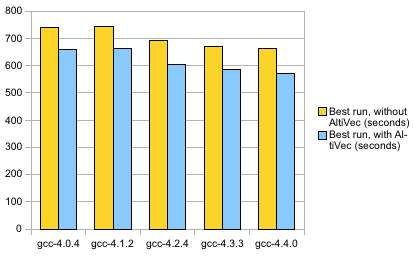
Someone asked me for performance numbers for the PowerPC, i.e., how efficiently can a PowerPC CPU decode certain types of multimedia via FFmpeg. So I ran my compiler benchmark script on the 5 compiler configurations currently in FATE. I did 2 runs, one with and one without AltiVec optimizations. I used the 512×224 MPEG-4 part 2 video with MP3 audio (104 minutes, ~144,000 frames). These tests were run on a 1.25 GHz PowerPC G4 (Mac Mini running Linux). The FFmpeg source code was at SVN revision 18711.


PowerPC performance comparison

Interesting stuff: The performance trends do not parallel the chaos we have seen with x86_32 and x86_64. Instead, we see continuous improvement.

Suggestions for improvement welcome, though there don’t seem to be a lot of tunable parameters for PowerPC in gcc.

See Also:

Progress On Those Crashers

Last December, I set about on the task of downloading and testing a huge number of files that were known, at one point, the crash FFmpeg. I devised a system for automatically running the files and determining whether they still crash in FFmpeg. Quite a few of them did. Then, I sort of let the project sit.

I got around to running a new round of tests with the utility I created in December and compared the results with those of 4 months ago. Today’s test was conducted with FFmpeg SVN-r18707 built with “gcc: 4.0.1 (Apple Inc. build 5484)”, 32-bit version, and run on Mac OS X.

Result December 8, 2008 April 27, 2009
Success 2148 2781
FFmpeg error 1333 1389
SIGABRT 6 6
SIGFPE 376 1
SIGKILL (timeouts) 16 17
SIGBUS 7 97
SIGSEGV 529 123

Great progress, especially on those floating point exceptions. I’m pretty sure nearly all of those were attributable to one or a few problems in the Real demuxer that have since been addressed. The only remaining problem in the FPE category is an AVI file.

The timeout category represents the number of files that ran longer than a minute (need to keep the process moving). The “FFmpeg error” category (return code 1) is on the rise. I surmise that’s because FFmpeg is getting better at rejecting errant files vs. crashing on them. I should really formulate a query that reveals which files’ status changed, and how, between runs.

A big reason I sat on this project for so long is that I didn’t know how to proceed. Should I start testing the problem files manually, collect stack traces, and flood the FFmpeg issue tracker with hundreds of new reports? I don’t want to deal with that kind of manual labor and I don’t think my co-devs want to deal with that volume of (possibly redundant) bug traffic.

Since December, I have developed another idea: Automatically running the problem files through gdb and looking for patterns. For example, I manually checked those 6 crashers that threw SIGABRT (the same 6 files from each run, BTW, and all ASF files). They all seem to fail as follows:

Program received signal SIGABRT, Aborted.
0x96dbbe42 in __kill ()
(gdb) bt
#0  0x96dbbe42 in __kill ()
#1  0x96dbbe34 in kill$UNIX2003 ()
#2  0x96e2e23a in raise ()
#3  0x96e3a679 in abort ()
#4  0x96e2f3db in __assert_rtn ()
#5  0x00026529 in ff_asf_parse_packet (s=0x1002600, pb=0xa00200, 
pkt=0xbfffe954) at /Users/melanson/ffmpeg/ffmpeg-main/libavformat/asfdec.c:709

It would be nice to create a script that identifies that all 6 of those files suffer from the same, or similar problem and group those files together in a report. I am not sure if gdb offers non-interactive options that are conducive to this situation. I know it has a -batch mode, but I’m not really sure what that’s for. If need be, I can always create a Python script that opens gdb in interactive mode and has a stdin/stdout conversation with it.

See Also: