Yearly Archives: 2009

Eee PC And Chrome

I complain about a lot of software on this blog. But I wanted to take this opportunity to praise some software for once– Easy Peasy and Google Chrome. I’ve had some ups and downs with my Eee PC 701 netbook— great unit but the vendor-supplied Linux distribution was severely lacking. I auditioned some netbook-tailored distros last year and found one that worked reasonably well while being a bit rough around the edges — Ubuntu-Eee. One notable problem I experienced a few weeks after I installed it was that the wireless network driver quit working (though to be fair, I understand that was a greater problem due to an Ubuntu update around the same time).

Eee PC 701 running Easy Peasy and Google Chrome

These days, Ubuntu-Eee has been renamed Easy Peasy. I was finally sufficiently motivated to try installing it when enough other things on my existing Ubuntu-Eee distro had broken. Essentially all the problems that troubled me in its predecessor distro have vanished– wireless works again (though I still can’t seem to toggle it), all the sound controls work, even the hibernation works which impressed me greatly (even if I never use it).

Pertaining to web browsers, I have traditionally been satisfied with Firefox. Sure, it has been growing large in recent times, but what software hasn’t? It’s the price of software progress and all. However, I took this opportunity to try out Google Chrome which I never thought I would have reason to care about. I am roundly impressed with its speed and responsiveness. Seriously, this browser might even be lean enough for the guru to consider using on a regular basis.

I’m pleased that I can forgo a replacement for this classic Eee PC netbook for the foreseeable future.
XML Monkey

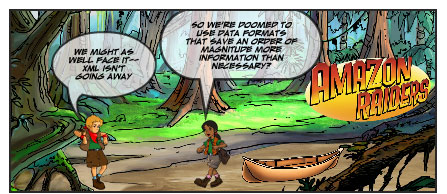
I’m trying to come to terms with the reality that is XML. I may not like the format but that won’t change the fact that I have to interoperate with various XML data formats already in the wild. In other words, treat it like any random multimedia format. For example, suppose I want to write software to interpret the various comics that I’ve created with Taco Bell’s series of Comics Constructors CD-ROMs.


Amazon Raiders: XML Monkey, top panel

Continue reading

Ramping Up On JavaScript

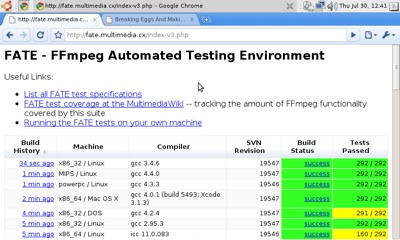
I didn’t think I would ever have sufficient motivation to learn JavaScript, but here I am. I worked a little more on that new FATE index page based on Google’s Visualization API. To that end, I constructed the following plan:

Part 1: Create A JSON Data Source
Create a JSON data source, now that I figured out how to do that correctly. JSON data really is just a JavaScript data structure. It can be crazy to look at since it necessitates packing dictionaries inside of arrays inside of dictionaries inside of arrays. (Check the examples– observe that the data structure ends with “}]}]}});”.) But in the end, the Google visualization knows what to do with it.

Done.

Part 2: Connect the JSON Data Source
Hook the JSON data source up to the newest revision of the FATE front page, rolled out a little while ago.

Done.

Part 3: Save The User’s Most Recent Sort Criteria
The problem is that the page resets the sort criteria on a refresh. There needs to be a way to refresh the page while maintaining that criteria. This leads me to think that I should have some “refresh” button embedded in the page which asks the server for updated data using a facility I have heard of named XMLHttpRequest. I found a simple tutorial on the matter but was put off by the passage “Because of variations among the Web browsers, creating this object is more complicated than it need be.”

Backup idea: Cookies. Using this tutorial as a guide, set a cookie whenever the user changes either the sort column or the sort order.

Done, though I may want to revisit the XHR idea one day.

Part 4: Make It Look Good
Finally, figure out how the div tag works to make the layout a little cleaner.

Done. Sort of. There are 2 div tags on the page now, one for the header and one for the table. I suppose I will soon have to learn CSS to really drag this page out of 1997.

Bonus: Caching the JSON Data
Ideally, the web browser makes the JSON data request using the If-Modified-Since HTTP header. Use a sniffer to verify this. If this is true, add a table to the FATE MySQL table which contains a single column specifying the timestamp when the web config cache table was last updated. If this time is earlier than the time in the request header, respond with a 304 (not modified) HTTP code.

Not done. It seems that these requests don’t set the appropriate HTTP header, at least not in Firefox.

I hope to put this page into service soon, just as soon as I can dump the rest of the existing index.php script into this new one. As usual, not elegant, but it works.

Renoise XRNS

A little piece of me died today when I read of the existence of XRNS, a music tracker format that uses XML. A music tracker format that uses XML! Can you imagine? If you can’t, Google for “filetype:xrns” to find plenty of samples.

[xml]
< ?xml version="1.0" encoding="UTF-8"?>


4
1
false
4
96
123
3
true

36
68
67
47

Untitled
By Somebody


[/xml]
And on it goes. It’s difficult to articulate why this feels so heretical. It’s like those old MOD/tracker formats were designed to be so pure, so efficient. This completely destroys that. Now your playback engine has to carry the baggage of a full XML parsing library.

There are elements of the FFmpeg development team that would enjoy seeing the program grow to be able to handle all the various tracker-type formats (myself included, obviously). It’s not going to be pretty when XRNS collides with FFmpeg.

Addendum: Share the love over on the Renoise forums.