Today is historic in the grand timeline of technical multimedia documentation (near and dear to my heart): It’s the day when Adobe released — without any questionable license restrictions — documentation for their SWF, FLV, and F4V file formats.
Yearly Archives: 2008
Memory Efficient FATE
The x86_32 and x86_64 FATE build machines are actually VMware Fusion-hosted virtual machines running in Mac OS X (which, indeed, shall one day perform FATE duty as well). I decided to run with the flock and use Ubuntu for these VMs. However, even with this Mac Mini maxed out to its unofficial limit of 3 gigabytes of RAM, I couldn’t help thinking that they were wasting a lot of resources by running full GNOME desktops. Each VMware session has 1/2 GB of RAM allocated to it and either an 8 or 16 GB disk. Overkill, or so I suspected. I won’t bore you with the tales of the minimal hardware on which I first started running Linux because many of you were once there. I made it a goal to get each build machine down to using a 2 GB disk and hopefully 128 MB of RAM.
I briefly researched Linux distributions that are designed to be tiny, like Damn Small Linux. But I have grown reasonably comfortable with managing Ubuntu and would like to see what I can do to make it lean. At first, I thought I could allocate a small disk, install the desktop CD image, and then either configure minimal installation or remove lots of packages and configure for no-graphics startup after the install. It turns out that Ubuntu desktop does not have much in the way of customization options, save for timezone and keyboard layout. That’s the trade-off they present for being so mainstream and simple. But the CD also can not install if it is only given 2 GB of disk to work with. It just sort of hangs at one point.
There are 2 other install options. First is the “alternate” desktop ISO. The description here sounds promising but in practice, it tries the same desktop installation. The last option is the server installation. I am a little wary of Linux distros designated as “server” distros. I have been bitten at least once by a default server installation that was locked down way too tight, like a guard dog that won’t let me near my own junkyard.
But I give it a whirl anyway and the server version of Ubuntu turns out to be exactly what I was looking for– no graphics, no office or multimedia applications, just a minimal install that only occupies 1/3 of the 2 GB disk.
Next, I check if I can get away with allocating a meager 128 MB or RAM to each system. How to determine absolute memory usage in Linux, what with buffers and caches, etc.? ‘top’ will generally report all memory is being used anyway. Fortunately, I read about a tool called ‘free’, run in a 3-second polling mode:
$ free -o -s 3
             total       used       free     shared    buffers     cached
Mem:        253080     212020      41060          0      36836     101876
Swap:            0          0          0
Actually, I just noticed that ‘top’ also reports the same buffer and cache statistics. Anyway, I had no trouble compiling FFmpeg on x86_32 with only 128 MB of RAM. I tried the same on x86_64. When the build process got to libavcodec/motion_est.c (oh yes, you know the monster of which I speak), I watched the buffers and cached columns gradually shrink while the used column steadily rose. Eventually, the operating system decided that the process was too fat to live. The upshot is that the x86_64 VM gets 256 MB of RAM. How about that? 64-bit programs really do need twice as much memory.
There’s still the issue of disk usage. 2 GB doesn’t stretch as far as it used to. Fortunately, the FATE test suite lives on a different machine. But I need to store many different compilers and hopefully the most recent ccache output for each of the compilers. Big space management strategy here: Configure FFmpeg with ‘–disable-debug’.
GSoC 2008 Students
Google has announced which students have earned slots for the 2008 Summer of Code. As with previous years, I don’t know whether to congratulate or console the constituents of this collection:
- Alexander Strange: Generic frame-level multithreading support for FFmpeg
- Bartlomiej Wolowiec: Nellymoser Encoder
- Jai Menon: ALAC Encoder
- Keiji Costantini: LGPL reimplementation of GPL sws_scale parts
- Kostya: AAC-LC Encoder
- Ramiro Polla: MLP/TrueHD encoder
- Sascha Sommer: WMA Pro Decoder
- Sisir Koppaka: VP3/Theora Encoder
- Zhentan Feng: MXF Muxer
Feast your eyes on those ambitious projects. It’s going to be quite a summer.
A hearty “thanks” and “good luck to you too” go out to the registered FFmpeg mentoring crew, including Andreas Setterlind, Andreas Öman, Aurélien Jacobs, Baptiste Coudurier, Benjamin Larsson, Jean-Baptiste Kempf, Justin Ruggles, Kristian Jerpetjoen, Luca Barbato, Reimar Döffinger, and Robert Swain (2006 GSoC Alumnus). And as always, there’s the unofficial über-mentor, Michael Niedermayer, who also has the final say in whether a project’s code is ready for inclusion into the tree.
BFI Boredom
In the nick of time, Sisir Koppaka finished the BFI playback system and qualified for FFmpeg’s 2008 Summer of Code:
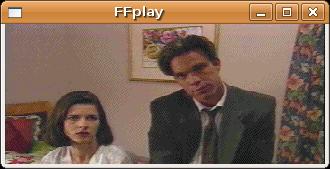
The format is used in a few multimedia-heavy games from Tsunami such as Flash Traffic: City of Angels, which is pictured above. Remember that FFmpeg does not stipulate that a supported format be at all useful, or that it come from a good game. As you can see from the sample above, not even the actors could maintain any enthusiasm through the production.