Breaking Eggs And Making Omelettes

Topics On Multimedia Technology and Reverse Engineering


Meta:

ANSI FATE

August 23rd, 2010 by Multimedia Mike

The new FATE server is shaping up well. I think most of the old configurations have been migrated to the new server. I see one new compiler for x86_64– PathScale. It’s not faring particularly well at this point.

New Tests
As I write this, I noticed that there are now an even 700 tests, twice as many as the last time I trumpeted such a milestone. (It should be noted that the new FATE system finally breaks down the master regression suite into individual tests.) Thankfully, it’s no longer necessary to wait for me to create or edit tests (anyone with FFmpeg privileges can do this), nor is it necessary to keep up with this blog to know exactly what tests are new. Now, you can simply inspect the file history on tests/fate.mak and tests/fate2.mak (I think these 2 files are going to merge in the near future).

Vitor, as of r24865: “Add FATE test for ANSI/ASCII animation and TTY demuxer.” Eh? What’s this about? I admit I was completely removed from FFmpeg development for much of June and July so I could have missed a lot. Fortunately, I can check the file history to see which lines were added to make this test happen. And if FATE is exercising the test, you know exactly where the samples will live. Here’s this new decoder in action on the relevant sample:
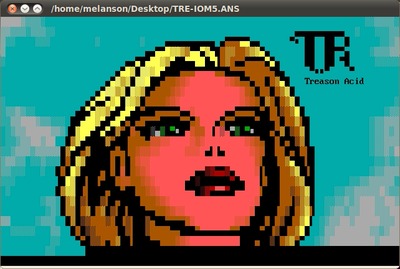


The file history fingers Suxen drol/Peter Ross for this handiwork. I might have guessed– the only person who is arguably more enamored with old, weird formats than even I. Now we wait for the day that YouTube has support for this format. I’m sure there are huge archives of these animations out there (and I wager that Trixter and Jason Scott know where).
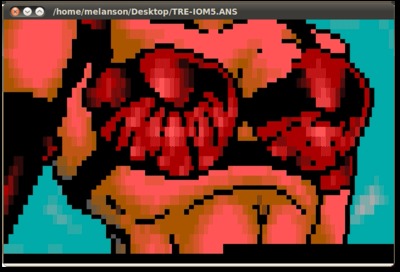


It’s an animation — it just keeps going

Meanwhile, the FATE suite now encompasses a bunch of perceptual audio formats, thanks to the 1-off testing method and a few other techniques. These formats include Bink audio, WMA Pro, WMA voice, Vorbis, ATRAC1, ATRAC3, MS-GSM, AC3, E-AC3, NellyMoser, TrueSpeech, Intel Music Coder, QDM2, RealAudio Cooker, QCELP (just going down the source control log here), and others, no doubt.

Then there’s this curious tidbit: “Add FATE test for WMV8 DRM”. The test spec is "fate-wmv8-drm: CMD = framecrc -cryptokey 137381538c84c068111902a59c5cf6c340247c39 -i $(SAMPLES)/wmv8/wmv_drm.wmv -an". I would still like to investigate FFmpeg’s cryptographic capabilities, which I suspect are moving in a direction to function as a complete SSL stack one day.

New Platforms
As for new platforms, the new FATE system finally allows testing on OS/2 (remember that classic? It was “the totally cool way to run your computer”). Thanks to Dave Yeo for taking this on.

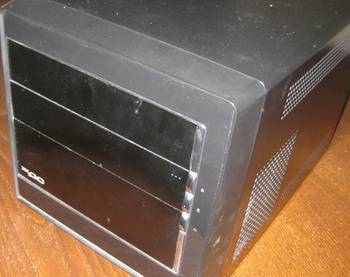
Further, a new MIPS-based platform recently appeared on the FATE list. This one reports itself as running on 74kf CPU. Googling for this processor quickly brings up Mans’ post about the Popcorn Hour device. So, congratulations to him for getting the mundane box to serve a higher purpose. Perhaps one day, I’ll be able to do the same for that Belco Alpha-400 netbook.
Posted in FATE Server | 2 Comments »

FFmpeg and Code Coverage Tools

August 21st, 2010 by Multimedia Mike

Code coverage tools likely occupy the same niche as profiling tools: Tools that you’re supposed to use somewhere during the software engineering process but probably never quite get around to it, usually because you’re too busy adding features or fixing bugs. But there may come a day when you wish to learn how much of your code is actually being exercised in normal production use. For example, the team charged with continuously testing the FFmpeg project, would be curious to know how much code is being exercised, especially since many of the FATE test specs explicitly claim to be “exercising XYZ subsystem”.

The primary GNU code coverage tool is called gcov and is probably already on your GNU-based development system. I set out to determine how much FFmpeg source code is exercised while running the full FATE suite. I ran into some problems when trying to use gcov on a project-wide scale. I spackled around those holes with some very ad-hoc solutions. I’m sure I was just overlooking some more obvious solutions about which you all will be happy to enlighten me.

Results
I’ve learned to cut to the chase earlier in blog posts (results first, methods second). With that, here are the results I produced from this experiment. This Google spreadsheet contains 3 sheets: The first contains code coverage stats for a bunch of FFmpeg C files sorted first by percent coverage (ascending), then by number of lines (descending), thus highlighting which files have the most uncovered code (ffserver.c currently tops that chart). The second sheet has files for which no stats were generated. The third sheet has “problems”. These files were rejected by my ad-hoc script.

Here’s a link to the data in CSV if you want to play with it yourself.

Using gcov with FFmpeg Read the rest of this entry »

Posted in FATE Server, Python | 8 Comments »

New FATE Test Coverage System

August 9th, 2010 by Multimedia Mike

I’ve been feeling a bit scattered for the last week since I was fired from my volunteer position as the FFmpeg QA manager, wondering if there is anything I should attempt to do with the project. It can’t be denied that the new system is working well. But one area I’ve wondered about is test coverage.

Under my old regime I tracked test coverage as a wiki page which was a highly flawed method– tedious and error-prone. There are those 2 adjectives again– tedious and error-prone; whenever I see those, I search for automation methods. I think that might be more plausible thanks to the new FATE’s tighter integration with the FFmpeg build system.

I don’t think anyone is working on this problem so I wanted to toss out a brainstorm:

  1. First, run ‘ffmpeg -formats’, ‘ffmpeg -codecs’, etc. and parse the output to collect a list of all the features (full list: -formats, -codecs, -bsfs, -protocols, -filters, -pix_fmts). Transform these lists into a standardized list of features, e.g., "DEVSD ffvhuff Huffyuv FFmpeg variant" represents features ‘decode-video-ffvhuff’, ‘encode-video-ffvhuff’, ‘ffvhuff-horizband’, and ‘ffvhuff-dr1′.
  2. Next, tag each individual test spec with the features that it exercises. E.g., test ‘fate-vqa-cc’ exercises features ‘demux-wsvqa’, ‘decode-video-vqavideo’, and ‘decode-audio-adpcm_ima_ws’.
  3. Finally, compare the data from parts 1 and 2. Print a list of all the features that are not exercised in FATE.

I think a lot of this could be implemented at the GNU make level. Then again, I’m no expert on GNU make syntax so I may be overestimating its capabilities. Or there might be simpler ways to automatically track test coverage stats based on the improved testing infrastructure.

Posted in FATE Server | 6 Comments »

FATE’s New Look

August 3rd, 2010 by Multimedia Mike

The FATE main page exposes a lot of data. The manner in which it is presented has always been bounded by my extremely limited web development abilities. I wrestled with whether I should learn better web development skills first and allow that to inform any improved design, or focus on the more useful design and invest my web development learning time towards realizing that design.

Fortunately, Mans solved this conundrum with an elegantly simple solution:


The top of the page displays a status bar that illustrates — at a glance — how functional the codebase is. The web page source code identifies this as the failometer. It took me a few seconds to recognize what information that status bar was attempting to convey; maybe it could use a succinct explanation.

Mini-Book Review
Read the rest of this entry »

Posted in FATE Server | 1 Comment »

FATE Under New Management

August 1st, 2010 by Multimedia Mike

At any given time, I have between 20-30 blog posts in some phase of development. Half of them seem to be contemplations regarding the design and future of my original FATE system and are thus ready for the recycle bin at this point. Mans is a man of considerably fewer words, so I thought I would use a few words to describe the new FATE system that he put together.

Overview
Here are the distinguishing features that Mans mentioned in his announcement message:

  • Test specs are part of the ffmpeg repo. They are thus properly versioned, and any developer can update them as needed.
  • Support for inexact tests.
  • Parallel testing on multi-core systems.
  • Anyone registered with FATE can add systems.
  • Client side entirely in POSIX shell script and GNU make.
  • Open source backend and web interface.
  • Client and backend entirely decoupled.
  • Anyone can contribute patches.

Client
The FATE build/test client source code is contained in tests/fate.sh in the FFmpeg source tree. The script — as the extension implies — is a shell script. It takes a text file full of shell variables, updates source code, configures, builds, and tests. It’s a considerably minor amount of code, especially compared to my original Python code. Part of this is because most of the testing logic has shifted into FFmpeg itself. The build system knows about all the FATE tests and all of the specs are now maintained in the codebase (thanks to all who spearheaded that effort– I think it was Vitor and Mans).

The client creates a report file which contains a series of lines to be transported to the server. The first line has some information about the configuration and compiler, plus the overall status of the build/test iteration. The second line contains ‘./configure’ information. Each of the remaining lines contain information about an individual FATE test, mostly in Base64 format.

Server
The server source code lives at http://git.mansr.com/?p=fateweb. It is written in Perl and plugs into a CGI-capable HTTP server. Authentication between the client and the server operates via SSH/SSL. In stark contrast to the original FATE server, there is no database component on the backend. The new system maintains information in a series of flat files.

Posted in FATE Server | No Comments »

Usurper of FATE

July 30th, 2010 by Multimedia Mike

Mans sent a message to the FFmpeg-devel list today:

A new FATE

Mike’s FATE system has done a great job over the last few years. It
is however beginning to prove inadequate in various ways:

[various shortcomings already dissected at length on this very blog]

To address the above-mentioned issues, I have been working on a
replacement system which is now ready to be announced.

Check it out: http://fate.ffmpeg.org/.

Considering that he just obsoleted something I’ve poured a lot of time and energy into over the last 2.5 years, is my first reaction to this news supposed to be unbridled joy? Hey, I’m already on record as stating that I wouldn’t mind throwing away all of FATE if there was a better alternative.

I’m not certain but I’m pretty sure that at this point, the original FATE server is practically obsolete. Mans is already testing all of his configurations as well as the configs I test. As soon as the other FATE installations switch over to the new server, I should be able to redirect fate.multimedia.cx -> fate.ffmpeg.org, sell most of my computers, and spend more time with my family.

Thanks, Mans!

Posted in FATE Server | 2 Comments »

Multiprocess FATE Revisited

June 25th, 2010 by Multimedia Mike

I thought I had brainstormed a simple, elegant, multithreaded, deadlock-free refactoring for FATE in a previous post. However, I sort of glossed over the test ordering logic which I had not yet prototyped. The grim, possibly deadlock-afflicted reality is that the main thread needs to be notified as tests are completed. So, the main thread sends test specs through a queue to be executed by n tester threads and those threads send results to a results aggregator thread. Additionally, the results aggregator will need to send completed test IDs back to the main thread.


But when I step back and look at the graph, I can’t rationalize why there should be a separate results aggregator thread. That was added to cut down on deadlock possibilities since the main thread and the tester threads would not be waiting for data from each other. Now that I’ve come to terms with the fact that the main and the testers need to exchange data in realtime, I think I can safely eliminate the result thread. Adding more threads is not the best way to guard against race conditions and deadlocks. Ask xine.


Read the rest of this entry »

Posted in FATE Server, Python | 4 Comments »

Revised FATE Test Spec System

June 8th, 2010 by Multimedia Mike

FATE involves some database tables that define the test specifications. Like everything else in FATE, the concept could use some improvement. After I prototyped an improved, multithreaded testing client, the next logical revision seemed to be the test spec system.

History
The test spec system has been handled by a single table that includes an FFmpeg command line (with a few possible modifiers thrown in), an integer ID, a human-friendly ID, a description, the expected command line return code, the expected command output, a maximum runtime, and a Boolean to indicate whether the test is to be considered active.

Adjunct to this test database is a large corpus of test media named the FATE suite.

At first, the FATE testing script used a direct MySQL database protocol to query the test specs from the server before every build/test cycle. I soon realized this was ludicrously inefficient since the test specs don’t change that often. So I cached the tests in a static file to be retrieved via HTTP, first in Python’s “pickled” (serialized) format, then in an SQLite database.

Planned Upgrades
There are 2 major features I would like to build into the system going forward:

  1. The ability to version the entire suite so that it’s possible to test old branches of FFmpeg
  2. Another database field to indicate which, if any, other test specs must be executed before this spec can be executed

I think I will take this opportunity to switch the test cache serialization format to JSON. I switched from Python pickling to SQLite because the latter was more portable between languages. JSON has that same benefit. Further, working with JSON data doesn’t require a round trip to disk (i.e., want to generate an SQLite database for sending via HTTP? It needs to go onto disk first. It’s possible to create and manipulate a database entirely in memory but not fetch the bits).

Things To Research

  • Pondering how version control systems operate and what they have to teach regarding how to version this data (including the question of whether I can just use an existing version control mechanism instead of creating my own system)
  • Efficient caching mechanism
  • Tagging test specs for alternate purposes such as longevity testing
  • Learn about web form programming in the 21st century so that it’s not quite as painful to maintain the system.

Preliminary Versioning Concept
Here is one approach I am thinking of: Create test groups. Each test spec is assigned to at least one test group. I can think of at least 2 groups: functional (the base test set in existence that validates functionality) and profiling (the projected test set that will be used for ongoing performance and memory profiling). The web frontend will allow for the creation of labels that will apply to a single group. Doing so will apply that label to all active tests in the group.

Posted in FATE Server | No Comments »

FATE Ends the Mac

June 4th, 2010 by Multimedia Mike

Did you know Mac OS X can even blue-screen? To be fair, it doesn’t actually present a blue screen. But when Mac OS X encounters a kernel panic, it looks like this:


True to form, Mac just has to be prettier and glossier than other operating systems, even in the area of system crashes.

The reason I bring this up is that the FATE system is bringing down my Mac. My Mac Mini is reliably dying every single time I try to execute my FATE client Python script. Maybe the weather is getting too warm.

Update, 2010-6-8: Following advice in the comments, I tried to run Memtest86 on the Mac Mini in question. I couldn’t get the machine to boot the CD I made. As an alternative, I turned the machine off and let it rest for a night. In the morning, I turned it on and ran the FATE client script. It’s working for now.

Posted in FATE Server | 12 Comments »

FATE Process Multi-Runner

May 17th, 2010 by Multimedia Mike

At long last, I have created a more efficient version of the FATE script which can leverage multiple CPU threads. After that, I created pretty graphs to demonstrate how much more efficiently multiple cores can operate vs. a singly-threaded testing program.

Read the rest of this entry »

Posted in FATE Server | 5 Comments »

« Previous Entries