Breaking Eggs And Making Omelettes

Topics On Multimedia Technology and Reverse Engineering


Meta:

DCT PR

July 2nd, 2009 by Multimedia Mike

Some people think that multimedia compression is basically all discrete cosine transform (DCT) and little else.

2 years ago at LinuxTag, I gave a fairly general presentation regarding FFmpeg and open source multimedia hacking (I just noticed that the main page still uses a photo of me and my presentation). I theorized that one problem our little community has when it comes to attracting new multimedia hacking talent is that the field seems scary and mathematically unapproachable. I have this perception that this is what might happen when a curious individual wants to get into multimedia hacking:

I wonder how multimedia compression works?

Well, I’ve heard that everyone uses something called MPEG for multimedia compression.

Further, I have heard something about how MPEG is based around the discrete cosine transform (DCT).

Let’s look up what the DCT is, exactly…


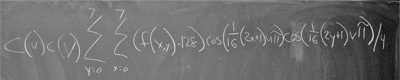
Discrete cosine transform written out on a chalkboard
Clever photo cribbed from a blog actually entitled Discrete Cosine

At which point the prospective contributor screams and runs away from the possibility of ever being productive in the field.

Now, the original talk discussed how that need not be the case, because DCT is really a minor part of multimedia technology overall; how there are lots and lots of diverse problems in the field yet to solve; and how there is room for lots of different types of contributors.

The notion of DCT’s paramount importance in the grand scheme of multimedia compression persists to this day. While reading the HTML5 spec development mailing list, Sylvia Pfeiffer expressed this same line of thinking vis-à-vis Theora:

Even if there is no vendor right now who produces an ASIC for Theora, the components of the Theora codec are not fundamentally different to the components of other DCT based codecs. Therefore, AISCs [sic] that were built for other DCT based codecs may well be adaptable by the ASIC vendor to support Theora.

This prompted me to recall something I read in the MPEG FAQ a long time ago:

MPEG is a DCT based scheme?

The DCT and Huffman algorithms receive the most press coverage (e.g. “MPEG is a DCT based scheme with Huffman coding”), but are in fact less significant when compared to the variety of coding modes signaled to the decoder as context-dependent side information. The MPEG-1 and MPEG-2 IDCT has the same definition as H.261, H.263, JPEG.

A few questions later, the FAQ describes no less than 18 different considerations that help compress video data in MPEG; only the first one deals with transforms. Theora is much the same way. When I wrote the document about Theora’s foundation codec, VP3, I started by listing off all of the coding methods involved: DCT, quantization, run length encoding, zigzag reordering, predictive coding, motion compensation, Huffman entropy coding, and variable length run length Booleans. Theora adds a few more concepts (such as encoding the large amount of stream-specific configuration data).

I used to have the same idea, though: I was one of the first people to download On2′s VpVision package (the release of their VP3 code) and try to understand the algorithm. I remember focusing on the DCT and trying to find DCT-related code, assuming that it was central to the codec. I was surprised and confused to find that a vast amount of logic was devoted to simply reversing DC coefficient prediction. At the end of a huge amount of frame reconstruction code was a small, humble call to an IDCT function.

What I would like to get across here is that Theora is rather different than most video codecs, in just about every way you can name (no, wait: the base quantization matrix for golden frames is the same as the quantization matrix found in JPEG). As for the idea that most DCT-based codecs are all fundamentally the same, ironically, you can’t even count on that with Theora– its DCT is different than the one found in MPEG-1/2/4, H.263, and JPEG (which all use the same DCT). This was likely done in On2′s valiant quest to make everything about the codec just different enough from every other popular codec, which runs quite contrary to the hope that ASIC vendors should be able to simply re-use a bunch of stuff used from other codecs.

Posted in Codec Technology | 10 Comments »

Reverse Engineering Math Formulas

March 22nd, 2009 by Multimedia Mike

Even though I have been studying and working on multimedia technology since 2000 — reverse engineering, documenting, and reimplementing a variety of audio and video codecs — I didn’t actually begin to understand why various algorithms achieved their compression until about 2003. I’m just like that — I study the practice first, and then the underlying theory eventually becomes clear to me (maybe; it has been 9 years and I still couldn’t explain everything about the discrete cosine transform if you asked).

I happened to be looking back over the ZMBV (DOSBox) video codec today. Read the rest of this entry »

Posted in Codec Technology | 5 Comments »

Special QuickTime Features

January 11th, 2009 by Multimedia Mike

I processed some more unknown samples today, the ones that came from last month’s big Picsearch score. I found some interesting QuickTime specimens. One of them was filed under video codec FourCC ‘fire’. The sample only contained one frame of type fire and that frame was very small (238 bytes) and looked to contain a number of small sub-atoms. Since the sample had a .mov extension, I decided to check it out in Apple’s QuickTime Player. It played fine, and you can see the result on the new fire page I made in the MultimediaWiki. Apparently, it’s built into QuickTime. The file also features a single frame of RPZA video data. My guess is that the logo on display is encoded with RPZA while the fire block defines parameters for a fire animation.

Moving right along, I got to another set of QuickTime samples that were filed under ‘gain’ video codec. This appears to be another meta-codec and this is what it looks like in action:


Apple QuickTime Player using the gain/fade feature

I decided to post this pretty screenshot here since I didn’t feel like creating another Wiki page for what I perceive to be not a “real” video codec. The foregoing CumulusQuickTimeSlideshow.mov sample comes from here and actually contains 5 separate trak atoms: 2 define ‘jpeg’ data, 1 is ‘gain’, 1 is ‘dslv’ and the last is ‘text’, which defines ASCII strings containing the filenames on the bottom of the slideshow. I have no idea what the dslv atom is for, but something, somewhere in the file defines whether this so-called alpha gain effect will use a cross fade (as seen with the Cumulus shapes) or if it will use an Iris transitional effect (as seen in the sample na_visit03.mov here).

So much about the QuickTime format remains a mystery.

Posted in Video Codecs | 3 Comments »

Video Coding Concepts: YUV and RGB Colorspaces And Pixel Formats

November 15th, 2007 by Multimedia Mike

If you have any experience in programming computer graphics, you probably know all about red/green/blue (RGB) video modes and pixel formats. Guess what? It is all useless now that you are working on video codec technology!

No, that’s not entirely true. Some video codecs operate on RGB video natively. A majority of modern codecs use some kind of YUV colorspace. We will get to that. Since many programmers are familiar with RGB pixel formats, let’s use that as a starting point.

RGB Colors

To review, computers generally display RGB pixels. These pixels have red (R), green (G), and blue (B) components to them. Here are the various combinations of R, G, and B components at their minimum (0) and maximum (255/0xFF) values:

R G B color notes:
0×00 0×00 0×00 absence of R, G, and B = full black
0×00 0×00 0xFF full blue
0×00 0xFF 0×00 full green
0×00 0xFF 0xFF
0xFF 0×00 0×00 full red
0xFF 0×00 0xFF
0xFF 0xFF 0×00
0xFF 0xFF 0xFF full R, G, and B combine to make full white

YUV Colors
If you are used to dealing with RGB colors, YUV will seem a bit unintuitive at first. What does YUV stand for? Nothing you would guess. It turns out Y stands for intensity. U stands for blue and V stands for red. U is also denoted as Cb and V is also denoted as Cr. So YUV is sometimes written as YCbCr.

Here are the various combinations of Y, U, and V components at their minimum (0) and maximum (255/0xFF) values:

Y U/
Cb
V/
Cr
color notes
0×00 0×00 0×00
0×00 0×00 0xFF
0×00 0xFF 0×00
0×00 0xFF 0xFF
0xFF 0×00 0×00 full green
0xFF 0×00 0xFF
0xFF 0xFF 0×00
0xFF 0xFF 0xFF
0×00 0×80 0×80 full black
0×80 0×80 0×80
0xFF 0×80 0×80 full white

So, all minimum and all maximum components do not generate intuitive (read: similar to RGB) results. In fact, all 0s in the YUV colorspace result in a dull green rather than black. That last point is useful to understand when a video is displaying a lot of green block errors– that probably means that the decoder is skipping blocks of data completely and leaving the underlying YUV data as all 0.

Further Reading:

Posted in Codec Technology, Video Codecs | 4 Comments »

Palette Communication

November 7th, 2007 by Multimedia Mike

If there is one meager accomplishment I think I can claim in the realm of open source multimedia, it would be as the point-man on palette support in xine, MPlayer, and FFmpeg.


Palette icon

Problem statement: Many multimedia formats — typically older formats — need to deal with color palettes alongside compressed video. There are generally three situations arising from paletted video codecs:

  1. The palette is encoded in the video codec’s data stream. This makes palette handling easy since the media player does not need to care about ferrying special data between layers. Examples: Autodesk FLIC and Westwood VQA.
  2. The palette is part of the transport container’s header data. Generally, a modular media player will need to communicate the palette from the file demuxer layer to the video decoder layer via an out-of-band/extradata channel provided by the program’s architecture. Examples: QuickTime files containing Apple Animation (RLE) or Apple Video (SMC) data.
  3. The palette is stored separately from the video data and must be transported between the demuxer and the video decoder. However, the palette could potentially change at any time during playback. This can provide a challenge if the media player is designed with the assumption that a palette would only occur at initialization. Examples: AVI files containing paletted video data (such as MS RLE) and Wing Commander III MVE.

Transporting the palette from the demuxer layer to the decoder layer is not the only be part of the battle. In some applications, such as FFmpeg, the palette data also needs to travel from the decoder layer to the video output layer, the part that creates a final video frame to either be displayed or converted. This used to cause a problem for the multithreaded ffplay component of FFmpeg. The original mechanism (that I put into place) was not thread-safe– palette changes ended up occurring sooner than they were supposed to. The primary ffmpeg command line conversion tool is single-threaded so it does not have the same problem. xine is multi-threaded but does not suffer from the ffplay problem because all data sent from the video decoder layer to the video output layer must be in a YUV format, thus paletted images are converted before leaving the layer. I’m not sure about MPlayer these days, but when I implemented a paletted format (FLIC), I rendered the data in higher bit depths in the decoder layer. I would be interested to know if MPlayer’s video output layer can handle palettes directly these days.

I hope this has been educational from a practical multimedia hacking perspective.

Posted in Codec Technology, Open Source Multimedia | 3 Comments »

VQ Case Study: Textures

April 27th, 2007 by Multimedia Mike

Per my understanding, a lot of 3D hardware operates by allowing the programmer to specify a set of vertices between which the graphics chip draws lines. Then, the programmer can specify that a bitmap needs to be plotted between some of those lines. In 3D graphics parlance, those bitmaps are called textures. More textures make a game prettier, but a graphics card only has so much memory for storing these textures. In order to stretch the video RAM budget, some graphics cards allow for compressing textures using vector quantization.

A specific example of VQ in 3D graphics hardware is the Sega Dreamcast with its PowerVR2 graphics hardware. Textures can be specified in a number of pixel formats including, but not limited to, RGB555, RGB565, and VQ. In the VQ mode, a 256-entry vector codebook is initialized somewhere in video RAM. Each vector is 8 bytes large and specifies a 2×2 block of pixels in either RGB555 or RGB565 (can’t remember which, or it might be configurable). For the texture in video RAM that is specified as VQ, each byte is actually an index into the codebook. Instant 8:1 compression, notwithstanding the 2048-byte codebook overhead which can be negligible depending on how many textures leverage the codebook and how large those textures are.

Posted in Codec Technology, Vector Quantization, Video Codecs | No Comments »

VQ Case Study: RoQ

April 26th, 2007 by Multimedia Mike

RoQ was first developed for the FMV-based adventure game The 11th hour and was later adopted by Id for the Quake III engine and derivative games.

RoQ operates in a YUV 4:2:0 space. However, it was developed for a game released in the late 1994/early 1995 timeframe. Back then, cutting edge video was 640×480 at 256 colors or maybe 64K colors. and it was not feasible to take a large video frame and convert the entire thing from YUV -> RGB 30, 24, or even 15 times per second. However, RoQ’s design solved some of these problems.

Read the rest of this entry »

Posted in Codec Technology, Vector Quantization, Video Codecs | No Comments »

VQ Case Study: Sorenson Video 1

April 25th, 2007 by Multimedia Mike

Sorenson Video 1 (SVQ1) makes me sentimental. It had a lot to do with why I started multimedia hacking. Strange that it all seems so simple now.

SVQ1 is a stark contrast to our last subject, Cinepak. SVQ1 does not store its codebooks in the encoded video bitstream. Rather, the codebooks are a hardwired characteristic of the coding scheme. That’s actually a really good thing considering that the algorithm is a hierarchical multistage vector quantizer.

Read the rest of this entry »

Posted in Codec Technology, Vector Quantization, Video Codecs | No Comments »

VQ Case Study: Cinepak

April 24th, 2007 by Multimedia Mike

Cinepak is a true classic among video codecs. It saw considerable use in the early days of FMV as it was easily encapsulated in both AVI and QuickTime files, the prevailing container formats in the early days of PC multimedia. It was also the standard FMV format on early CD-based consoles such as the Sega Saturn and Atari Jaguar.

Read the rest of this entry »

Posted in Codec Technology, Vector Quantization, Video Codecs | No Comments »

First Love: Vector Quantization

April 23rd, 2007 by Multimedia Mike

Someone was asking me about vector quantizer codecs recently. Sure, Wikipedia has the obligatory article. To its credit, the article is actually halfway useful these days (I seem to recall that it used to be a lot more impenetrable). It doesn’t help that the concept is identified by 2 terms that, by themselves, sound somewhat intimidating: ‘vector’ and ‘quantization’.

Anyway, he asked the right person about VQ codecs because I happen to love VQ codecs and can go on for days about them. In fact, I might do just that. I’ll start with a post about the theory and then describe specific examples in separate posts.

Read the rest of this entry »

Posted in Codec Technology, Vector Quantization, Video Codecs | 9 Comments »

« Previous Entries