Deobfuscation Redux: JavaScript

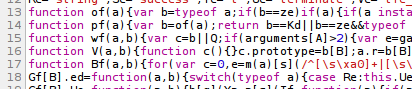
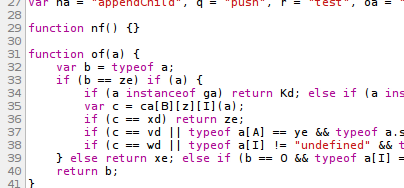
Google recently released version 12 of their Chrome browser. This version adds a new feature that automatically allows deobfuscating obfuscated JavaScript source code.

Before:


After:


As a reverse engineering purist, I was a bit annoyed. Not at the feature, just the naming. This is clearly code beautification but not necessarily deobfuscation. The real obfuscation comes not from removing whitespace but from renaming variable and function names to terse 1- and 2-letter identifiers. True automated deobfuscation — which entails recovering the original variable and function identifiers as well as source code comments — is basically impossible.

Still, it makes me wonder if there is any interest in a JavaScript deobfuscator that operates similar to my Java deobfuscator which was one of the first things I published on this blog. The general idea is automatically replace function names with random English verbs (since functions correspond to actions) and variable names with random animal names (I decided “English nouns” encompassed too broad a category of words). I suspect the day that someone releases a proprietary multimedia codec in a pure (though obfuscated) JavaScript format is that day that I will try to accomplish this, if it hasn’t been done already.

See also:

Music Video Idiosyncrasies

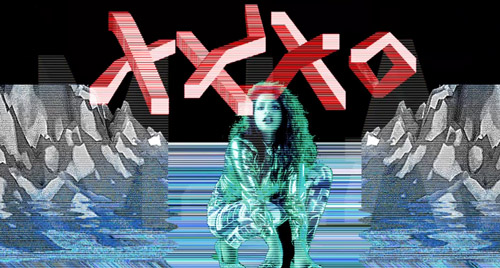
So I’m watching a fairly recent music video for a song named “XXXO” from an artist named M.I.A. when I’m suddenly assaulted by this imagery:


… and I enter nervous convulsions. You see, while this might seem to be an odd video effect to the casual viewer, to a multimedia hacker, it appears to be deliberately antagonistic. To anyone who has written a video codec, this scene looks like an entire casserole of video bugs, combining creeping plane offsets errors, chroma problems, and interlacing havoc. The craziest part is to realize that this is probably some kind of standard video effect / filter type. Upon a repeat viewing, I realized that the entire video sort of looks like an amateur video editor’s first week using video software.

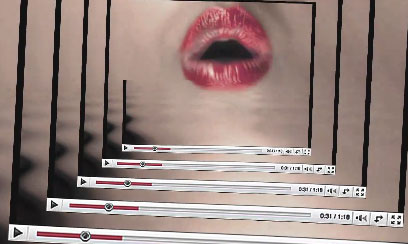
Elsewhere in the video, a YouTube-style video frame vortex highlights the proceedings. I guess I need to come to terms with the fact that the ubiquitous player frame is just part of the digital Zeitgeist now:


Vintage Video Strangeness
I’m a long-time music video junkie but I have a tendency of examining them entirely too closely. I first saw Paula Abdul’s video for “Cold-Hearted” when I was just starting to understand multimedia technology and how it interacted with emerging home computers. Imagine how confused I was when I tried to make sense of the actions performed by our eMaestro “Chuck” whom Paula has instructed to “hit it”. First, he hits a key followed by 3 quick strikes on a second key:


Then, the “start music” action is apparently bound to a particular key on the electronic keyboard:
Continue reading

SNES Hardware Compression

I was browsing the source code for some Super Nintendo Entertainment System (SNES) emulators recently. I learned some interesting things about compression hardware. I had previously uncovered one compression algorithm used in an SNES title but that was implemented in software.

SNES game cartridges — being all hardware — were at liberty to expand the hardware capabilities of the base system by adding new processors. The most well-known of these processors was the Super FX which allows for basic polygon graphical rendering, powering such games as Star Fox. It was by no means the only such add-on processor, though. Here is a Wikipedia page of all the enhancement chips used in assorted SNES games. A number of them mention compression and so I delved into the emulators to find the details:

  • The Super FX is listed in Wikipedia vaguely as being able to decompress graphics. I see no reference to decompression in emulator source code.
  • DSP-3 emulation source code makes reference to LZ-type compression as well as tree/symbol decoding. I’m not sure if the latter is a component of the former. Wikipedia lists the chip as supporting “Shannon-Fano bitstream decompression.”
  • Similar to Super FX, the SA-1 chip is listed in Wikipedia as having some compression capabilities. Again, either that’s not true or none of the games that use the chip (notably Super Mario RPG) make use of the feature.
  • The S-DD1 chip uses arithmetic and Golomb encoding for compressing graphics. Wikipedia refers to this as the ABS Lossless Entropy Algorithm. Googling for further details on that algorithm name yields no results, but I suspect it’s unrelated to anti-lock brakes. The algorithm is alleged to allow Star Ocean to smash 13 MB of graphics into a 4 MB cartridge ROM (largest size of an SNES cartridge).
  • The SPC7110 can decompress data using a combination of arithmetic coding and Z-curve/Morton curve reordering.

No, I don’t plan to implement codecs for these schemes. But it’s always comforting to know that I could.

Not directly a compression scheme, but still a curious item is the MSU1 concept put forth by the bsnes emulator. This is a hypothetical coprocessor implemented by bsnes that gives an emulated cartridge access to a 4 GB address space. What to do with all this space? Allow for the playback of uncompressed PCM audio as well as uncompressed video at 240x144x256 colors @ 30 fps. According to the docs and the source code, the latter feature doesn’t appear to be implemented, though; only the raw PCM playback.

Back on the Salty Track

After I posted about my initial encounter and frustration with Google’s Native Client (NaCl) SDK and took a deep breath, I realized that I achieved an important proof of concept– I successfully played music using the NaCl SDK audio output interface. Then I started taking a closer read through the (C-based set of) header files and realized I might be able to make a go of it after all. I had much better luck this time and managed to create a proper Native Client interface that allows for controlling playback, presenting metadata, and toggling individual voices (a fascinating tool for studying classic game music).

I haven’t bothered to post the actual plugin because, really, what’s the point? I started with NaCl SDK 0.3 which requires Chrome 12, which means terribly limited reach, even among Chrome users. At least, that was true when I restarted this little project. Chrome 12 was formally released this past week. Chrome development really does move at breakneck pace.

Anyway, here is a static screenshot of what the plugin currently looks like:
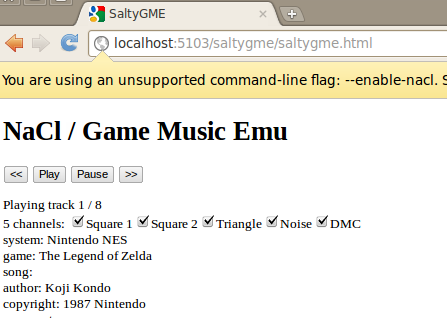


Not pretty, but it does the job.

Dev Journal
Various notes based on this outing:

  • Portability: I tested my plugin using Chrome 12 on 64-bit Windows, Mac, and Linux. Mac and Linux both work; Windows does not.
  • Build System: SDK 0.3 is still lacking in its ability to compile .cpp files (instead of .cc files); necessary because libgme is C++ using .cpp files. This requires some build system modification.
  • Getting the interfaces: This is where I got tripped up the first time around. get_browser_interface() from their example actually refers to a parameter passed in through the PPP_InitializeModule() function. The SDK’s template generator renames this to get_browser().
  • Debugging: I feel unstoppable once I have a printf() mechanism available to me during development. To that end, console.log() from JavaScript outputs to Chrome’s built-in JavaScript console log while putting printf() statements in the actual NaCl plugin causes the messages to show up in ~/.xsession-errors on Linux/X.
  • Size Matters: The binaries generated with the NaCl 0.3 SDK are ridiculously huge. The basic “Hello World” example in C compiles to binaries that are 6.7 MB and 7.8 MB for the 32- and 64-bit builds, respectively. This made me apprehensive to build a full version of SaltyGME that contains all the bells and whistles offered by the library. However, all of the GME code compiled into the binary adds very little size. Curiously, the C++ version of “Hello World” only ranges from 1.8-2.0 MB for 32- and 64-bit. Is there some kind of C tax happening here? Note that running ‘strip’ on the resulting .nexe files (they’re ELF files, after all) brings the sizes down into the C++ range, but at the cost of causing them to not work (more specifically, not even load).
  • No Messaging: The NaCl SDK is supposed to have a messaging interface which allows the NaCl plugin to send asynchronous messages up to the hosting page. When I try to instantiate it, I get a NULL. I’m stuck with the alternative of polling from the JavaScript side to, e.g., determine when a song has finished loading via the network.

That’s all I can think of for now. I may work on this a little more (I’d like to at least see some audio visualization). Maybe Google will enable NaCl per default sometime around Chrome 21 and this program will be ready for prime time by then.

See Also: