Author Archives: Multimedia Mike

Apple’s Crimes Against Usability

I found myself on the receiving end of a brand new Apple 64-bit G5 computer today. I carefully unwrapped each of the components that were lovingly, individually wrapped, put the system together, started it up, faked the requisite demographic/marketing data when Mac OS X demanded that I enter it in order to get to log into the OS, and then I was all set, but not before insisting vociferously that I really did not want a trial account on .Mac. Looking at the computer itself I had a nagging feeling like maybe it was supposed to have an optical drive. It had a rectangular region on the front panel that looked like it might serve such a purpose but it did not seem to open up. I emailed my friend Gregg, old college pal and part-time Mac lover, and he advised me to try the F12 key. That gives me the current weather in Cupertino, CA. Seriously. Failing that, he told me to look for a special key on the keyboard. Sure enough, there is something that resembles an eject symbol over on the numeric keypad which causes the optical drive to breathe life.

Now, see, I believe this to be clearly outside the realm of what a keyboard is chartered to do. Further, it reminds me that there truly is no justice in the world as evidenced by the fact that Steve Jobs was never made to stand trial and answer for his company’s crimes against usability in the form of Apple’s QuickTime Player v4.
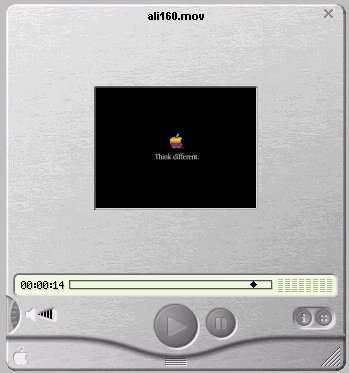

Apple QuickTime Player 4
The second greatest crime against user interfaces, second only to Winamp. Click here for an in-depth review of the usability deficiencies.
ATI’s Dangerous Eyeballs

I purchased a new, fanless ATI All-In-Wonder (“2006 Edition”) video card. My primary goal was to replace an old ATI Radeon 8500 video card cooled by a jet engine-powered fan which completely defeated the purpose of having a quiet, small form factor desktop computer.

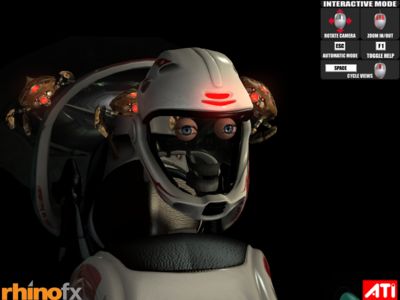
I have approximately zero interest (or knowledge) in the technical underpinnings of 3D graphics programming. But since the AIW-2006 is apparently based on an ATI Radeon 9600 — which is 1100 better than my previous card — I wanted to see how much prettier the graphics could possibly be (the old card ran Doom 3 and Far Cry demos tolerably well). A number of the included demos mention “X800” and “X850” which I believe are the latest generation ATI chipsets. Anyway, I fire up the first demo entitled, “Dangerous Curves”. It’s pretty much a run-of-the-mill gratuitous action sequence. But I thought the designers had a curious “vision” of the vignette’s protagonist:


Captain Eyeballs
Captain Eyeballs makes his(?) daring escape

I was led to believe something was amiss which the graphics screen was overlaid with a series of errors messages, also dumped to a text file, along the lines of “[SSGenericAPI_D3D.cpp] (line 1256): Can’t compile HLSL pixel shader. The D3D error message is: (1706): error X5608: Compiled shader code uses too many arithmetic instruction slots (69). Max. allowed by the target (ps_2_0) is 64. [oRubyHelmetSk.ssh] (line 329): Error creating Pixel Shader”

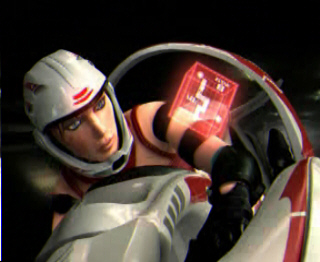
Fortunately, the bonus DVD also included the MPEG of the rendered 3D sequence (you can download either the demo or the movie here). It turns out there is supposed to be more to detail to our hero(ine):


Dangerous Curves
Ah, that looks a little less unsettling

Brute Force Puzzles

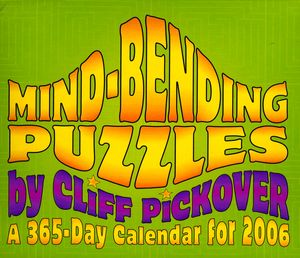
Cliff Pickover continues his torment of humanity with six puzzles each week (Saturday and Sunday are combined) with his 2006 day-by-day calendar:


Cliff Pickover's Instrument of Terror

As a good number of his puzzles can be solved by brute forcing through the entire solution space, modern computing technology can assist us greatly in mitigating Pickover’s reign of terror. Such is the case with the January 19 puzzle. The actual puzzle is explained a bit more “colorfully”. I’ll distill the mathematical principles. There is a grid of 8 squares laid out as a 4×2 matrix:

  1 2 3 4
  5 6 7 8

You have to place 8 letters in the 4 squares: (B G I O R T V Y) obeying the following rules: Neither R nor I can occupy square 1 or 5; neither V nor T can occupy squares 1..4. Y is left of R, V is left of T, R is above I, and O and B are on odd quares. I took the “p is left of q” type rules to mean that p to directly to the left of q.

Anyway, I deductively came up with a solution. But it seemed there might be more solutions. Sure enough, the official solution was different but challenged the reader to find out how many solutions there are. Fine! I will. Read on to find the solutions and the program to figure it out…

Continue reading →

NES Compression

For budding computer geeks like myself, volume 20/January 1991 issue of Nintendo Power magazine (Mega Man III cover) was of particular interest. In this issue, the editors attempted to shed some light on the technical matters driving the 8-bit Nintendo Entertainment System and give insufferable know-it-alls further opportunity to truly know it all.


8-bit Nintendo Entertainment System

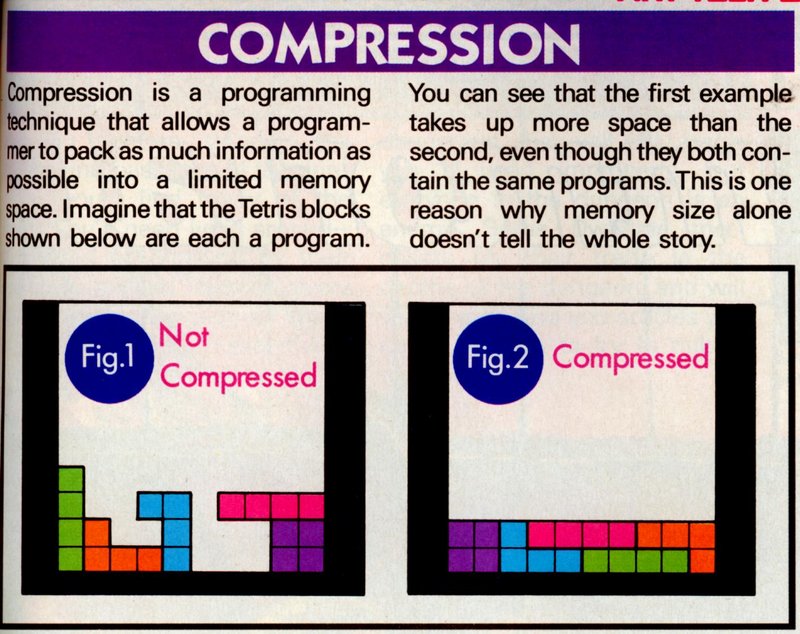
I still recall the puerile, simplistic explanation for compression using a metaphor every Nintendo nerd could relate to: Tetris! I still think about this article sometimes and wonder what compression method they used and for which games. In fact, I located the relevant article section and scanned it for your enjoyment/edification:


NES Compression
Click for larger image

I came across this document describing a compression algorithm used for a Zelda game on the Super NES, the direct successor to the NES, both market-wise and on a technical level. It seems that the scheme is largely a flexible RLE scheme which allows for decoding single- or double-byte runs (output 5 instances of byte 0x56 vs. output 5 instances of 0x56 0x42); decoding runs of an incrementing byte (e.g., output a sequence of 4 incrementing bytes starting with 0xA2: 0xA2 0xA3 0xA4 0xA5); and even using into the encoded buffer as a dictionary and copying runs from a specified index.