Breaking Eggs And Making Omelettes

Topics On Multimedia Technology and Reverse Engineering


Archives:

Meta:

Dreamcast Operating Systems

September 15th, 2010 by Multimedia Mike

The Sega Dreamcast was famously emblazoned with a logo proudly announcing that it was compatible with Windows CE:
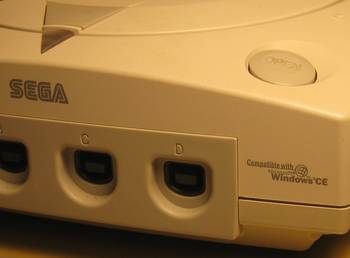


It’s quite confusing. The console certainly doesn’t boot into some version of Windows to launch games. Apparently, there was a special version of CE developed for the DC and game companies had the option to leverage it. I do recall that some game startup screens would similarly advertise Windows CE.

Once the homebrew community got ahold of the device, the sky was the limit. I think NetBSD was the first alternative OS to support the Dreamcast. Meanwhile, I have recollections of DC Linux and LinuxDC projects along with more generic Linux-SH and SH-Linux projects.
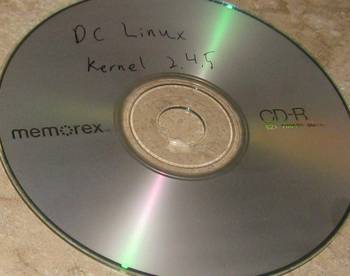


DC Evolution hosts a disc image available for download with an unofficial version of DC Linux, assembled by one Adrian O’Grady. I figured out how to burn the disc (burning DC discs is a blog post of its own) and got it working in the console.

It’s possible to log in directly via the physical keyboard or through a serial terminal provided that you have a coder’s cable. That reminds me– my local Fry’s had a selection of USB-to-serial cables. I think this is another area that is sufficiently commoditized that just about any cable ought to work with Linux out of the box. Or maybe I’m just extrapolating from the experience of having the cheapest cable in the selection (made by io connect) plug and play with Linux.
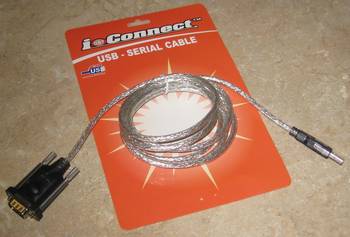


Look! No messy converter box in the middle as in the Belkin case. The reason I went with this cable is that the packaging claimed it was capable of up to 500 Kbits/sec. Most of the cables advertised a max of 115200 bps. I distinctly recall being able to use the DC coder’s cable at 230400 bps a long time ago. Alas, 115200 seems to be the speed limit, even with this new USB cable.

Anyway, the distribution is based on a 2.4.5 kernel circa 2001. I tried to make PPP work over the serial cable but the kernel doesn’t have support. If you’re interested, here is some basic information about the machine from Linux’s perspective, gleaned from some simple commands. This helps remind us of a simpler time when Linux was able to run comfortably on a computer with 16 MB of RAM.

Debian GNU/Linux testing/unstable dreamcast ttsc/1

dreamcast login: root
Linux dreamcast 2.4.5 #27 Thu May 31 07:06:51 JST 2001 sh4 unknown

Most of the programs included with the Debian GNU/Linux system are
freely redistributable; the exact distribution terms for each program
are described in the individual files in /usr/share/doc/*/copyright

Debian GNU/Linux comes with ABSOLUTELY NO WARRANTY, to the extent
permitted by applicable law.

dreamcast:~# uname -a
Linux dreamcast 2.4.5 #27 Thu May 31 07:06:51 JST 2001 sh4 unknown

dreamcast:~# cat /proc/cpuinfo  Read the rest of this entry »

Posted in Sega Dreamcast | 8 Comments »

Launch Leech and the History of WMV

September 13th, 2010 by Multimedia Mike

I was combing through my programming archives again and came across an old Perl script called launch-leech.pl. This was a private script I used to maintain for the benefit of myself and a few friends. See, there was this site called Launch.com (URL doesn’t seem to do anything as of this writing but here’s the Wikipedia page). Purchased by Yahoo! in 2001, Launch still maintained their independent branding. They also carried a lot of music videos, of which I am a huge junkie. launch-leech.pl was the tool I used to download the videos. This was particularly useful since I stubbornly clung to dialup internet access until mid-2004 and it would have been impossible to stream video at any decent quality (though there were 56k streams, so like I said– not possible at any decent quality).


Technically
I followed Launch.com for many years. To be honest, I only “followed” in that I figured out where their “latest videos” URL lived and regularly polled it. Each video had either a 6-, 7-, or 8-digit unique ID that could be plugged into the launch-leech.pl script which would then have a conversation with the relevant servers, determine the correct streaming URL with the highest quality, then download and save the URL by handing it off to an external program (first ASFRecorder, though I later switched to mmsclient).

At one point, I even wrote a crawler that compiled an offline database of all the videos, their IDs and their metadata. I never thought of anything interesting to do with it, though.


Windows Media Legacy
During these glory days of leeching, Launch.com streamed using Windows Media. I admit, it’s a bit of a blur now — the site might have used Real or QuickTime, but I was obviously most in tune with the WM side. I remember when I first found the site circa 2000-2001, the videos were in MS MPEG-4v3, and the high quality bitrate was 300 kbits/sec. Eventually, Launch.com would stream WMV7, WMV8, and finally WMV9, with bitrates up to 700 kbits/sec. However, they never broke free of the 320×240 encoding resolution, which was frustrating. When I wasn’t able to notice any substantial difference between 300 and 700 kbits/sec, I felt it might be time to put those extra bits to work on a resolution upgrade.

At least they were nice enough to re-encode a number of old videos using better codecs and bitrates with each revision, thus prompting me to scan through the site collecting updated video IDs for download.


Epilogue
I don’t clearly remember when I stopped visiting Launch.com. Video-wise, the web has been a blur of Flash video ever since about 2006. Meanwhile, I spent a lot of time collecting a bunch of music videos in the first half of the decade only to find that pretty much every version of every music video made since the dawn of time is available on demand thanks to YouTube. I have found that this phenomenon manifests in many areas as internet technology marches on.

The Real Entertainment
The launch-leech.pl tool represents a recurring pattern for me. I derive as much — if not more — entertainment from creating programs like launch-leech.pl (and implicitly reverse engineering something in the process; in this case, a website) as I do from the intended entertainment media itself. I seem to have this issue a lot with games, too.

Is this an issue for anyone else? Am I the only one who would rather play with the box that a shiny toy comes packaged in?

Posted in General | 5 Comments »

Naive Sorenson Video 1 Encoder

September 11th, 2010 by Multimedia Mike

(Yes, the word is “naive” — or rather, “naïve” — not “native”. People always try to correct me when I use the word. Indeed, it should actually be written with 2 dots over the ‘i’ but who has a keyboard that can easily do that?)

At the most primitive level, programming a video encoder is about writing out a sequence of bits that the corresponding video decoder will understand. It’s sort of like creating a program — represented as a stream of opcodes — that will run on a given microprocessor or virtual machine. In fact, reading a video codec bitstream specification will reveal a lot of terminology along the lines of “transmitting information to the decoder” or “signaling the decoder to do xyz.”

Creating a good encoder that will deliver decent quality at a reasonable bitrate is difficult. Creating a naive encoder that produces a technically compliant bitstream, not so much.


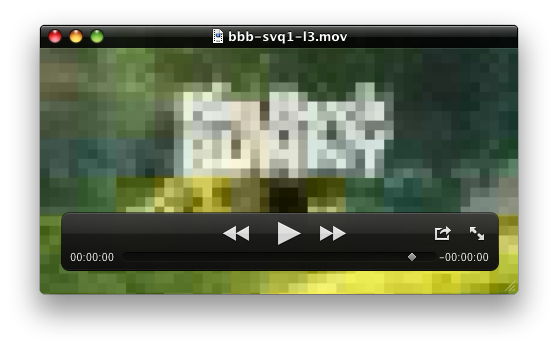
When I wrote an FFmpeg encoder for Sorenson Video 1 (SVQ1), the first step was to just create a minimally compliant bitstream. The coarsest encoding mode that SVQ1 allows is to encode the average (mean) of each 16×16 block of samples. So I created an encoder that just encoded the mean of each block. Apple’s QuickTime Player was able to play the resulting video in all of its blocky glory. The result rather reminds me of the Super Nintendo’s mosaic effect.

Level 5 blocks (mean-only 16×16 encoding):


Level 3 blocks (mean-only 8×8 encoding):


It’s one thing for your own decoder (in this case, FFmpeg’s own decoder) to be able to decode the data. The big test is whether the official decoder (in this case, Apple QuickTime Player) can decode the file.


Now that’s a good feeling. After establishing that sort of baseline, it’s possible to adapt more and more features of the codec.

Posted in General | 5 Comments »

Dreamcast Anniversary Programming

September 9th, 2010 by Multimedia Mike

This day last year saw a lot of nostalgia posts on the internet regarding the Sega Dreamcast, launched 10 years prior to that day (on 9/9/99). Regrettably, none of the retrospectives that I read really seemed to mention the homebrew potential, which is the aspect that interested me. On the occasion of the DC’s 11th anniversary, I wanted to remind myself how to build something for the unit and do so using modern equipment and build tools.


Background
Like many other programmers, I initially gained interest in programming because I desired to program video games. Not content to just plunk out games on a PC, I always had a deep, abiding ambition to program actual video game hardware. That is, I wanted to program a purpose-built video game console. The Sega Dreamcast might be the most ideal candidate to ever emerge for that task. All that was required to run your own software on the unit was the console, a PC, some free software tools, and a special connectivity measure.

The Equipment
Here is the hardware required (ideally) to build software for the DC:

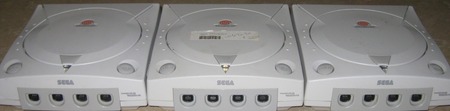
  • The console itself (I happen to have 3 of them laying around, as pictured above)
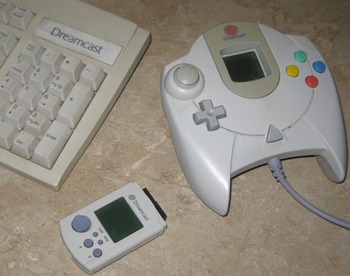
  • Some peripherals: Such as the basic DC controller, the DC keyboard (flagship title: Typing of the Dead), and the visual memory unit (VMU)


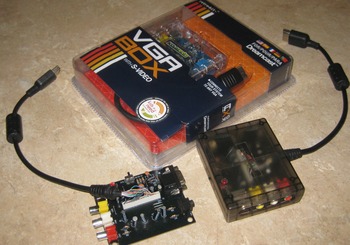
  • VGA box: The DC supported 480p gaming via a device that allowed you to connect the console straight to a VGA monitor via 15-pin D-sub. Not required for development, but very useful. I happen to have 3 of them from different third parties:


  • Finally, the connectivity measure for hooking the DC to the PC.
    Read the rest of this entry »

Posted in Game Hacking, Sega Dreamcast | 9 Comments »

How Much H.264 In Each Encoder?

September 7th, 2010 by Multimedia Mike

Thanks to my recent experiments with code coverage tools, I have a powerful new — admittedly somewhat specious — method of comparing programs. For example, I am certain that I have read on more than one occasion that Apple’s H.264 encoder sucks compared to x264 due, at least in part, to the Apple encoder’s alleged inability to exercise all of H.264′s features. I wonder how to test that claim?

Experiment
Use code coverage tools to determine which H.264 encoder uses the most features.

Assumptions

  • Movie trailers hosted by Apple will all be encoded with the same settings using Apple’s encoder.
  • Similarly, Yahoo’s movie trailers will be encoded with consistent settings using an unknown encoder.
  • Encoding a video using FFmpeg’s libx264-slow setting will necessarily throw a bunch of H.264′s features into the mix (I really don’t think this assumption holds much water, but I also don’t know what “standard” x264 settings are).

Methodology

  • Grab a random Apple-hosted 1080p movie trailer and random Yahoo-hosted 1080p movie trailer from Dave’s Trailer Page.
  • Use libx264/FFmpeg with the ‘slow’ preset to encode Big Buck Bunny 1080p from raw PNG files.
  • Build FFmpeg with code coverage enabled.
  • Decode each file to raw YUV, ignore audio decoding, generate code coverage statistics using gcovr, reset stats after each run by deleting *.gcda files.

Results

  • x264 1080p video: 9968 / 134203 lines
  • Apple 1080p trailer: 9968 / 134203 lines
  • Yahoo 1080p trailer: 9914 / 134203 lines

I also ran this old x264-encoded file (ImperishableNightStage6Low.mp4) through the same test. It demonstrated the most code coverage with 10671 / 134203 lines.

Conclusions
Conclusions? Ha! Go ahead and jump all over this test. I’m already fairly confident that it’s impossible (or maybe just very difficult) to build a single H.264-encoded video that exercises every feature that FFmpeg’s decoder supports. For example, is it possible for a file to use both CABAC and CAVLC entropy methods? If it’s possible, does any current encoder do that?

Posted in General | 2 Comments »

Using gcovr with FFmpeg

September 5th, 2010 by Multimedia Mike

When I started investigating code coverage tools to analyze FFmpeg, I knew there had to be an easier way to do what I was trying to do (obtain code coverage statistics on a macro level for the entire project). I was hoping there was a way to ask the GNU gcov tool to do this directly. John K informed me in the comments of a tool called gcovr. Like my tool from the previous post, gcovr is a Python script that aggregates data collected by gcov. gcovr proves to be a little more competent than my tool.

Results
Here is the spreadsheet of results, reflecting FATE code coverage as of this writing. All FFmpeg source files are on the same sheet this time, including header files, sorted by percent covered (ascending), then total lines (descending).

Methodology
I wasn’t easily able to work with the default output from the gcovr tool. So I modified it into a tool called gcovr-csv which creates data that spreadsheets can digest more easily.

  • Build FFmpeg using the '-fprofile-arcs -ftest-coverage' in both the extra cflags and extra ldflags configuration options
  • 'make'
  • 'make fate'
  • From build directory: 'gcovr-csv > output.csv'
  • Massage the data a bit, deleting information about system header files (assuming you don’t care how much of /usr/include/stdlib.h is covered — 66%, BTW)

Leftovers
I became aware of some spreadsheet limitations thanks to this tool: Read the rest of this entry »

Posted in FATE Server | 6 Comments »

Bye Bye FATE Machine

September 3rd, 2010 by Multimedia Mike

This is the computer that performed the lion’s share of FATE cycles for the past 1.5 years before Mans put a new continuous integration system into service. I’ve now decided to let the machine go. I can’t get over how odd this feels since this thing is technically the best machine I own.


It’s a small form factor Shuttle PC (SD37P2 v2); Core 2 Duo 2.13 GHz; 2 GB RAM; 400 GB SATA HD; equipped with the only consistently functional optical drive in my house (uh oh). I used it as my primary desktop from March 2007 – November 2008, at which point I repurposed it for FATE cycles.

As mentioned, the craziest part is that this is technically the best computer in my house. My new EeePC 1201PN isn’t at quite the same level; my old EeePC can’t touch it, of course; the Mac Mini has a little more RAM but doesn’t stack up in nearly all other areas. But the Shuttle just isn’t seeing that much use since the usurpation. I had it running automated backup duty for multimedia.cx but that’s easy enough to move to another, lower-powered system.

Maybe the prognosticators are correct and the PC industry has matured to the point where raw computing power simply doesn’t matter anymore. I fancy myself as someone who knows how to put CPU power to work but even I don’t know what to do with the computing capacity I purchased over 3 years ago.

Where will the Shuttle go? A good home, I trust– I know a family that just arrived in the country and could use a computer.

Posted in FATE Server | 1 Comment »

Linux Media Player Survey Circa 2001

September 1st, 2010 by Multimedia Mike

Here’s a document I scavenged from my archives. It was dated September 1, 2001 and I now publish it 9 years later. It serves as sort of a time capsule for the state of media player programs at the time. Looking back on this list, I can’t understand why I couldn’t find MPlayer while I was conducting this survey, especially since MPlayer is the project I eventually started to work for a few months after writing this piece.

For a little context, I had been studying multimedia concepts and tech for a year and was itching to get my hands dirty with practical multimedia coding. But I wanted to tackle what I perceived as unsolved problems– like playback of proprietary codecs. I didn’t want to have to build a new media playback framework just to start working on my problems. So I surveyed the players available to see which ones I could plug into and use as a testbed for implementing new decoders.

Regarding Real Player, I wrote: “We’re trying to move away from the proprietary, closed-source ‘solutions’”. Heh. Was I really an insufferable open source idealist back in the day?

Anyway, here’s the text with some Where are they now? commentary [in brackets]:


Towards an All-Inclusive Media Playing Solution for Linux

I don’t feel that the media playing solutions for Linux set their sights high enough, even though they do tend to be quite ambitious. Read the rest of this entry »

Posted in General | 4 Comments »