Running Windows XP In 2016

I have an interest in getting a 32-bit Windows XP machine up and running. I have a really good yet slightly dated and discarded computer that seemed like a good candidate for dedicating to this task. So the question is: Can Windows XP still be installed from scratch on a computer, activated, and used in 2016? I wasn’t quite sure since I have heard stories about how Microsoft has formally ended support for Windows XP as of the first half of 2014 and I wasn’t entirely sure what that meant.

Spoiler: It’s still possible to install and activate Windows XP as of the writing of this post. It’s also possible to download and install all the updates published up until support ended.

The Candidate Computer
This computer was assembled either in late 2008 or early 2009. It was a beast at the time.
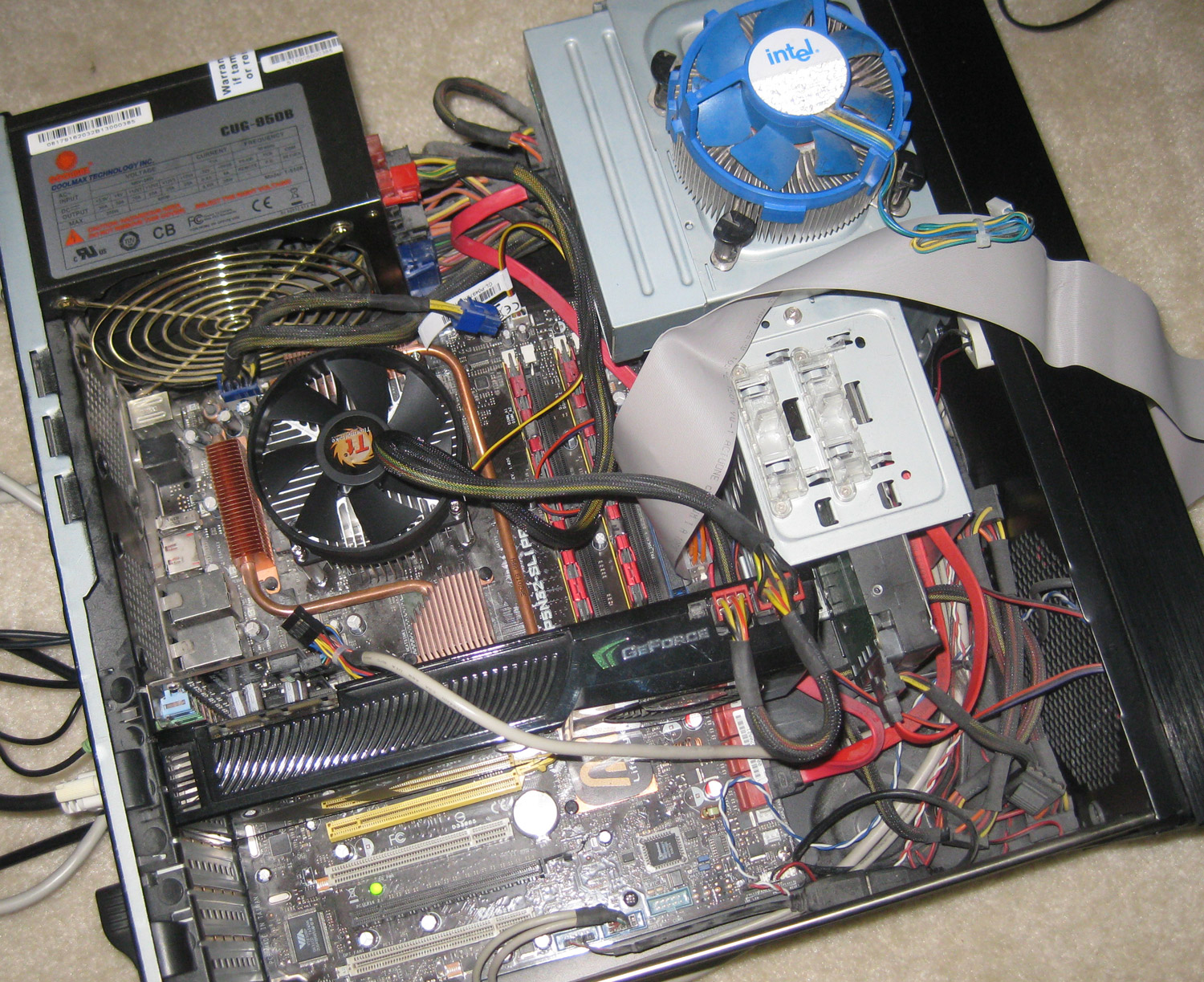

New old Windows XP computer
Click for a larger image

It was built around the newly-released NVIDIA GTX 280 video card. The case is a Thermaltake DH-101, which is a home theater PC thing. The motherboard is an Asus P5N32-SLI Premium with a Core 2 Duo X6800 2.93 GHz CPU on board. 2 GB of RAM and a 1.5 TB hard drive are also present.

The original owner handed it off to me because their family didn’t have much use for it anymore (too many other machines in the house). Plus it was really, obnoxiously loud. The noisy culprit was the stock blue fan that came packaged with the Intel processor (seen in the photo) whining at around 65 dB. I replaced the fan and brought the noise level way down.

As for connectivity, the motherboard has dual gigabit NICs (of 2 different chipsets for some reason) and onboard wireless 802.11g. I couldn’t make the latter work and this project was taking place a significant distance from my wired network. Instead, I connected a USB 802.11ac dongle and antenna which is advertised to work in both Windows XP and Linux. It works great under Windows XP. Meanwhile, making the adapter work under Linux provided a retro-computing adventure in which I had to modify C code to make the driver work.

So, score 1 for Windows XP over Linux here.

The Simple Joy of Retro-computing
One thing you have to watch out for when you get into retro-computing is fighting the urge to rant about the good old days of computing. Most long-time computer users have a good understanding of the frustration that computers keep getting faster by orders of magnitude and yet using them somehow feels slower and slower over successive software generations.
Continue reading

Things I Have Learned About Emscripten

3 years ago, I released my Game Music Appreciation project, a website with a ludicrously uninspired title which allowed users a relatively frictionless method to experience a range of specialized music files related to old video games. However, the site required use of a special Chrome plugin. Ever since that initial release, my #1 most requested feature has been for a pure JavaScript version of the music player.

“Impossible!” I exclaimed. “There’s no way JS could ever run fast enough to run these CPU emulators and audio synthesizers in real time, and allow for the visualization that I demand!” Well, I’m pleased to report that I have proved me wrong. I recently quietly launched a new site with what I hope is a catchier title, meant to evoke a cloud-based retro-music-as-a-service product: Cirrus Retro. Right now, it’s basically the same as the old site, but without the wonky Chrome-specific technology.

Along the way, I’ve learned a few things about using Emscripten that I thought might be useful to share with other people who wish to embark on a similar journey. This is geared more towards someone who has a stronger low-level background (such as C/C++) vs. high-level (like JavaScript).

General Goals
Do you want to cross-compile an entire desktop application, one that relies on an extensive GUI toolkit? That might be difficult (though I believe there is a path for porting qt code directly with Emscripten). Your better wager might be to abstract out the core logic and processes of the program and then create a new web UI to access them.

Do you want to compile a game that basically just paints stuff to a 2D canvas? You’re in luck! Emscripten has a porting path for SDL. Make a version of your C/C++ software that targets SDL (generally not a tall order) and then compile that with Emscripten.

Do you just want to cross-compile some functionality that lives in a library? That’s what I’ve done with the Cirrus Retro project. For this, plan to compile the library into a JS file that exports some public functions that other, higher-level, native JS (i.e., JS written by a human and not a computer) will invoke.

Memory Levels
When porting C/C++ software to JavaScript using Emscripten, you have to think on 2 different levels. Or perhaps you need to force JavaScript into a low level C lens, especially if you want to write native JS code that will interact with Emscripten-compiled code. This often means somehow allocating chunks of memory via JS and passing them to the Emscripten-compiled functions. And you wouldn’t believe the type of gymnastics you need to execute to get native JS and Emscripten-compiled JS to cooperate.
Continue reading

Emscripten and Web Audio API

Ha! They said it couldn’t be done! Well, to be fair, I said it couldn’t be done. Or maybe that I just didn’t have any plans to do it. But I did it– I used Emscripten to cross-compile a CPU-intensive C/C++ codebase (Game Music Emu) to JavaScript. Then I leveraged the Web Audio API to output audio and visualize the audio using an HTML5 canvas.

Want to see it in action? Here’s a demonstration. Perhaps I will be able to expand the reach of my Game Music site when I can drop the odd Native Client plugin. This JS-based player works great on Chrome, Firefox, and Safari across desktop operating systems.

But this endeavor was not without its challenges.

Programmatically Generating Audio
First, I needed to figure out the proper method for procedurally generating audio and making it available to output. Generally, there are 2 approaches for audio output:

  1. Sit in a loop and generate audio, writing it out via a blocking audio call
  2. Implement a callback that the audio system can invoke in order to generate more audio when needed

Option #1 is not a good idea for an event-driven language like JavaScript. So I hunted through the rather flexible Web Audio API for a method that allowed something like approach #2. Callbacks are everywhere, after all.

I eventually found what I was looking for with the ScriptProcessorNode. It seems to be intended to apply post-processing effects to audio streams. A program registers a callback which is passed configurable chunks of audio for processing. I subverted this by simply overwriting the input buffers with the audio generated by the Emscripten-compiled library.

The ScriptProcessorNode interface is fairly well documented and works across multiple browsers. However, it is already marked as deprecated:

Note: As of the August 29 2014 Web Audio API spec publication, this feature has been marked as deprecated, and is soon to be replaced by Audio Workers.

Despite being marked as deprecated for 8 months as of this writing, there exists no appreciable amount of documentation for the successor API, these so-called Audio Workers.

Vive la web standards!

Visualize This
The next problem was visualization. The Web Audio API provides the AnalyzerNode API for accessing both time and frequency domain data from a running audio stream (and fetching the data as both unsigned bytes or floating-point numbers, depending on what the application needs). This is a pretty neat idea. I just wish I could make the API work. The simple demos I could find worked well enough. But when I wired up a prototype to fetch and visualize the time-domain wave, all I got were center-point samples (an array of values that were all 128).

Even if the API did work, I’m not sure if it would have been that useful. Per my reading of the AnalyserNode API, it only returns data as a single channel. Why would I want that? My application supports audio with 2 channels. I want 2 channels of data for visualization.

How To Synchronize
So I rolled my own visualization solution by maintaining a circular buffer of audio when samples were being generated. Then, requestAnimationFrame() provided the rendering callbacks. The next problem was audio-visual sync. But that certainly is not unique to this situation– maintaining proper A/V sync is a perennial puzzle in real-time multimedia programming. I was able to glean enough timing information from the environment to achieve reasonable A/V sync (verify for yourself).

Pause/Resume
The next problem I encountered with the Web Audio API was pause/resume facilities, or the lack thereof. For all its bells and whistles, the API’s omission of such facilities seems most unusual, as if the design philosophy was, “Once the user starts playing audio, they will never, ever have cause to pause the audio.”

Then again, I must understand that mine is not a use case that the design committee considered and I’m subverting the API in ways the designers didn’t intend. Typical use cases for this API seem to include such workloads as:

  • Downloading, decoding, and playing back a compressed audio stream via the network, applying effects, and visualizing the result
  • Accessing microphone input, applying effects, visualizing, encoding and sending the data across the network
  • Firing sound effects in a gaming application
  • MIDI playback via JavaScript (this honestly amazes me)

What they did not seem to have in mind was what I am trying to do– synthesize audio in real time.

I implemented pause/resume in a sub-par manner: pausing has the effect of generating 0 values when the ScriptProcessorNode callback is invoked, while also canceling any animation callbacks. Thus, audio output is technically still occurring, it’s just that the audio is pure silence. It’s not a great solution because CPU is still being used.

Future Work
I have a lot more player libraries to port to this new system. But I think I have a good framework set up.

Dreamcast Track Sizes

I’ve been playing around with Sega Dreamcast discs lately. Not playing the games on the DC discs, of course, just studying their structure. To review, the Sega Dreamcast game console used special optical discs named GD-ROMs, where the GD stands for “gigadisc”. They are capable of holding about 1 gigabyte of data.

You know what’s weird about these discs? Each one manages to actually store a gigabyte of data. Each disc has a CD portion and a GD portion. The CD portion occupies the first 45000 sectors and can be read in any standard CD drive. This area is divided between a brief data track and a brief (usually) audio track.

The GD region starts at sector 45000. Sometimes, it’s just one humongous data track that consumes the entire GD region. More often, however, the data track is split between the first track and the last track in the region and there are 1 or more audio tracks in between. But the weird thing is, the GD region is always full. I made a study of it (click for a larger, interactive graph):


Dreamcast Track Sizes

Some discs put special data or audio bonuses in the CD region for players to discover. But every disc manages to fill out the GD region. I checked up on a lot of those audio tracks that divide the GD data and they’re legitimate music tracks. So what’s the motivation? Why would the data track be split in 2 pieces like that?

I eventually realized that I probably answered this question in this blog post from 4 years ago. The read speed from the outside of an optical disc is higher than the inside of the same disc. When I inspect the outer data tracks of some of these discs, sure enough, there seem to be timing-sensitive multimedia FMV files living on the outer stretches.

One day, I’ll write a utility to take apart the split ISO-9660 filesystem offset from a weird sector.