Method For Crawling Google

I wanted to crawl Google in order to harvest a large corpus of certain types of data as yielded by a certain search term (we’ll call it “term” for this exercise). Google doesn’t appear to offer any API to automatically harvest their search results (why would they?). So I sat down and thought about how to do it. This is the solution I came up with.



FAQ
Q: Is this legal / ethical / compliant with Google’s terms of service?
A: Does it look like I care? Moving right along…

Manual Crawling Process
For this exercise, I essentially automated the task that would be performed by a human. It goes something like this:

  1. Search for “term”
  2. On the first page of results, download each of the 10 results returned
  3. Click on the next page of results
  4. Go to step 2, until Google doesn’t return anymore pages of search results

Google returns up to 1000 results for a given search term. Fetching them 10 at a time is less than efficient. Fortunately, the search URL can easily be tweaked to return up to 100 results per page.

Expanding Reach
Problem: 1000 results for the “term” search isn’t that many. I need a way to expand the search. I’m not aiming for relevancy; I’m just searching for random examples of some data that occurs around the internet.

My solution for this is to refine the search using the “site” wildcard. For example, you can ask Google to search for “term” at all Canadian domains using “site:.ca”. So, the manual process now involves harvesting up to 1000 results for every single internet top level domain (TLD). But many TLDs can be more granular than that. For example, there are 50 sub-domains under .us, one for each state (e.g., .ca.us, .ny.us). Those all need to be searched independently. Same for all the sub-domains under TLDs which don’t allow domains under the main TLD, such as .uk (search under .co.uk, .ac.uk, etc.).

Another extension is to combine “term” searches with other terms that are likely to have a rich correlation with “term”. For example, if “term” is relevant to various scientific fields, search for “term” in conjunction with various scientific disciplines.

Algorithmically
My solution is to create an SQLite database that contains a table of search seeds. Each seed is essentially a “site:” string combined with a starting index.

Each TLD and sub-TLD is inserted as a searchseed record with a starting index of 0.

A script performs the following crawling algorithm:

  • Fetch the next record from the searchseed table which has not been crawled
  • Fetch search result page from Google
  • Scrape URLs from page and insert each into URL table
  • Mark the searchseed record as having been crawled
  • If the results page indicates there are more results for this search, insert a new searchseed for the same seed but with a starting index 100 higher

Digging Into Sites
Sometimes, Google notes that certain sites are particularly rich sources of “term” and offers to let you search that site for “term”. This basically links to another search for ‘term site:somesite”. That site gets its own search seed and the program might harvest up to 1000 URLs from that site alone.

Harvesting the Data
Armed with a database of URLs, employ the following algorithm:

  • Fetch a random URL from the database which has yet to be downloaded
  • Try to download it
  • For goodness sake, have a mechanism in place to detect whether the download process has stalled and automatically kill it after a certain period of time
  • Store the data and update the database, noting where the information was stored and that it is already downloaded

This step is easy to parallelize by simply executing multiple copies of the script. It is useful to update the URL table to indicate that one process is already trying to download a URL so multiple processes don’t duplicate work.

Acting Human
A few factors here:

  • Google allegedly doesn’t like automated programs crawling its search results. Thus, at the very least, don’t let your script advertise itself as an automated program. At a basic level, this means forging the User-Agent: HTTP header. By default, Python’s urllib2 will identify itself as a programming language. Change this to a well-known browser string.
  • Be patient; don’t fire off these search requests as quickly as possible. My crawling algorithm inserts a random delay of a few seconds in between each request. This can still yield hundreds of useful URLs per minute.
  • On harvesting the data: Even though you can parallelize this and download data as quickly as your connection can handle, it’s a good idea to randomize the URLs. If you hypothetically had 4 download processes running at once and they got to a point in the URL table which had many URLs from a single site, the server might be configured to reject too many simultaneous requests from a single client.

Conclusion
Anyway, that’s just the way I would (and did) do it. What did I do with all the data? That’s a subject for a different post.

Adorable spider drawing from here.

Who Invented FLIC?

I have been reading through “All Your Base Are Belong To Us: How 50 Years of Video Games Conquered Pop Culture” by Harold Goldberg. Despite the title, Zero Wing has yet to be mentioned (I’m about halfway done).


I just made it through the chapter describing early breakthrough CD-ROM games, including Myst, The 7th Guest, and The 11th Hour. Some interesting tidbits:

The 7th Guest
Of course, Graeme Devine created a new FMV format (called VDX, documented here) for The 7th Guest. The player was apparently called PLAY and the book claims that Autodesk was so impressed by the technology that it licensed the player for use in its own products. When I think of an Autodesk multimedia format, I think of FLIC. The VDX coding format doesn’t look too much like FLIC, per my reading.

Here’s the relevant passage (pp 118-119):

Devine began working on creating software within the CD-ROM disk that would play full-motion video. Within days he had a robust but small ninety-kilobyte player called PLAY that was so good, it was licensed by Autodesk, the makers of the best 3-D animation program at the time. Then Devine figured out a way to compress the huge video files so that they would easily fit on two CD-ROMs.

Googling for “autodesk trilobyte play program” (Trilobyte was the company behind 7th Guest) led me to this readme file for a program called PLAY73 (hosted at Jason Scott’s massive CD-ROM archive, and it’s on a disc that, incidentally, I donated to the archive; so, let’s here it for Jason’s tireless archival efforts! And for Google’s remarkable indexing prowess). The file — dated September 10, 1991 — mentions that it’s a FLICK player, copyright Trilobyte software.


However, it also mentions being a Groovie Player. Based on ScummVM’s reimplementation of the VDX format, Groovie might refer to the engine behind The 7th Guest.

So now I’m really interested: Did Graeme Devine create the FLIC file format? Multimedia nerds want to know!

I guess not. Thanks to Jim Leonard for digging up this item: “I developed the flic file format for the Autodesk Animator.” Jim Kent, Dr. Dobbs Magazine, March 1993.

The PLAY73 changelog reveals something from the bad old days of DOS/PC programming: The necessity of writing graphics drivers for 1/2 dozen different video adapters. The PLAY73 readme file also has some vintage contact address for Graeme Devine; remember when addresses looked like these?

If you have any comments, please send them to:
	Compuserve: 72330,3276
	Genie     : G.DEVINE
	Internet  : 72330,3276@compuserve.com

The 11th Hour
The book didn’t really add anything I didn’t already know regarding the compression format (RoQ) used in 11th Hour. I already knew how hard Devine worked at it. This book took pains to emphasize the emotional toll taken on the format’s creator.

I wonder if he would be comforted to know that, more than 15 years later, people are still finding ways to use the format.

Dreamcast Archival

Console homebrew communities have always had a precarious relationship with console pirates. The same knowledge and skills useful for creating homebrew programs can usually be parlayed into ripping games and cajoling a console into honoring ripped copies. For this reason, the Dreamcast homebrew community tried hard to distance itself from pirates, rippers, and other unsavory characters.


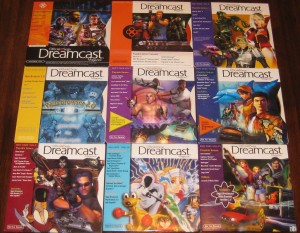
Lot of 9 volumes of the Official Sega Dreamcast Magazine

Funny how times change. While I toed the same line while I was marginally a part of the community back in the day, now I think I’m performing a service for video game archivists and historians by openly publishing the same information. I know of at least one solution already. But I think it’s possible to do much better.

Pre-existing Art
Famed Japanese game hacker BERO (FFmpeg contributors should recognize his name from a number of Dreamcast-related multimedia contributions including CRI ADX and SH-4 optimizations) crafted a program called dreamrip based on KOS’s precursor called libdream. This is the program I used to extract 4XM multimedia files from Alone in the Dark: The New Nightmare.

Fun facts: The Sega Dreamcast used special optical discs called GD-ROMs. The GD stands for ‘GigaDisc’ which implied that they could hold roughly a gigabyte of data. How long do you think it takes to transfer that much data over a serial cable operating at 115,200 bits/second (on the order of 11 Kbytes/sec)? I seem to recall entire discs requiring on the order of 27-28 hours to archive.

If only I possessed some expertise in data compression which might expedite this process.

KallistiOS’ Unwitting Help
The KallistiOS (KOS) console-oriented RTOS provides all the software infrastructure necessary for archiving (that’s what we’ll call it in this post) Dreamcast games. KOS exposes the optical disc’s filesystem via the /cd mount point on the VFS. From there, KOS provides functions for communicating with a host computer via ethernet (broadband adapter) or serial line (DC coder’s cable). To this end, KOS exposes another mount point on the VFS named /pc which allows direct access to the host PC’s filesystem.

Thus, it’s pretty straightforward to use KOS to access the files (or raw sectors) of the Dreamcast disc and then send them over the communication line to the host PC. Simple.

Compressing Before Transfer
Right away, I wonder about compiling 3 different compression libraries: libz, libbz2, and liblzma. The latter 2 are exceptionally CPU-intensive to compress. Then again, it doesn’t really matter how long the compressor takes to do its job as long as it can average better than 11 Kbytes/sec on a 200MHz Hitachi SH-4 CPU. KOS can be set up in a preemptive threading mode which means it should be possible to read sectors and compress them while keeping the UART operating at full tilt.

A 4th compression algorithm should be in play here as well: FLAC. Since some of these discs contain red book CD audio tracks that need archival, lossless audio compression should be useful.

This post serves as a rough overview for possible future experiments. Readers might have further brainstorms.

CD-R Read Speed Experiments

I want to know how fast I can really read data from a CD-R. Pursuant to my previous musings on this subject, I was informed that it is inadequate to profile reading just any file from a CD-R since data might be read faster or slower depending on whether the data is closer to the inside or the outside of the disc.

Conclusion / Executive Summary
It is 100% true that reading data from the outside of a CD-R is faster than reading data from the inside. Read on if you care to know the details of how I arrived at this conclusion, and to find out just how much speed advantage there is to reading from the outside rather than the inside.

Science Project Outline

  • Create some sample CD-Rs with various properties
  • Get a variety of optical drives
  • Write a custom program that profiles the read speed

Creating The Test Media
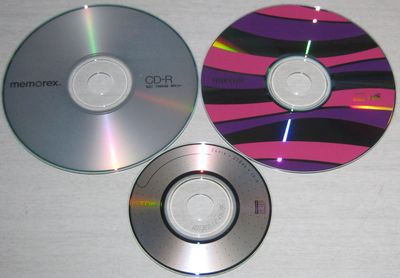
It’s my understanding that not all CD-Rs are created equal. Fortunately, I have 3 spindles of media handy: Some plain-looking Memorex discs, some rather flamboyant Maxell discs, and those 80mm TDK discs:


My approach for burning is to create a single file to be burned into a standard ISO-9660 filesystem. The size of the file will be the advertised length of the CD-R minus 1 megabyte for overhead– so, 699 MB for the 120mm discs, 209 MB for the 80mm disc. The file will contain a repeating sequence of 0..0xFF bytes.

Profiling
I don’t want to leave this to the vagaries of any filesystem handling layer so I will conduct this experiment at the sector level. Profiling program outline:

  • Read the CD-ROM TOC and get the number of sectors that comprise the data track
  • Profile reading the first 20 MB of sectors
  • Profile reading 20 MB of sectors in the middle of the track
  • Profile reading the last 20 MB of sectors

Unfortunately, I couldn’t figure out the raw sector reading on modern Linux incarnations (which is annoying since I remember it being pretty straightforward years ago). So I left it to the filesystem after all. New algorithm:

  • Open the single, large file on the CD-R and query the file length
  • Profile reading the first 20 MB of data, 512 kbytes at a time
  • Profile reading 20 MB of sectors in the middle of the track (starting from filesize / 2 – 10 MB), 512 kbytes at a time
  • Profile reading the last 20 MB of sectors (starting from filesize – 20MB), 512 kbytes at a time

Empirical Data
I tested the program in Linux using an LG Slim external multi-drive (seen at the top of the pile in this post) and one of my Sega Dreamcast units. I gathered the median value of 3 runs for each area (inner, middle, and outer). I also conducted a buffer flush in between Linux runs (as root: 'sync; echo 3 > /proc/sys/vm/drop_caches').

LG Slim external multi-drive (reading from inner, middle, and outer areas in kbytes/sec):

  • TDK-80mm: 721, 897, 1048
  • Memorex-120mm: 1601, 2805, 3623
  • Maxell-120mm: 1660, 2806, 3624

So the 120mm discs can range from about 10.5X all the way up to a full 24X on this drive. For whatever reason, the 80mm disc fares a bit worse — even at the inner track — with a range of 4.8X – 7X.

Sega Dreamcast (reading from inner, middle, and outer areas in kbytes/sec):

  • TDK-80mm: 502, 632, 749
  • Memorex-120mm: 499, 889, 1143
  • Maxell-120mm: 500, 890, 1156

It’s interesting that the 80mm disc performed comparably to the 120mm discs in the Dreamcast, in contrast to the LG Slim drive. Also, the results are consistent with my previous profiling experiments, which largely only touched the inner area. The read speeds range from 3.3X – 7.7X. The middle of a 120mm disc reads at about 6X.

Implications
A few thoughts regarding these results:

  • Since the very definition of 1X is the minimum speed necessary to stream data from an audio CD, then presumably, original 1X CD-ROM drives would have needed to be capable of reading 1X from the inner area. I wonder what the max read speed at the outer edges was? It’s unlikely I would be able to get a 1X drive working easily in this day and age since the earliest CD-ROM drives required custom controllers.
  • I think 24X is the max rated read speed for CD-Rs, at least for this drive. This implies that the marketing literature only cites the best possible numbers. I guess this is no surprise, similar to how monitors and TVs have always been measured by their diagonal dimension.
  • Given this data, how do you engineer an ISO-9660 filesystem image so that the timing-sensitive multimedia files live on the outermost track? In the Dreamcast case, if you can guarantee your FMV files will live somewhere between the middle and the end of the disc, you should be able to count on a bitrate of at least 900 kbytes/sec.

Source Code
Here is the program I wrote for profiling. Note that the filename is hardcoded (#define FILENAME). Compiling for Linux is a simple 'gcc -Wall profile-cdr.c -o profile-cdr'. Compiling for Dreamcast is performed in the standard KallistiOS manner (people skilled in the art already know what they need to know); the only variation is to compile with the '-D_arch_dreamcast' flag, which the default KOS environment adds anyway.

Continue reading