WMA Lossless and ProRes Encoder

The projects (FFmpeg / Libav) just got a WMA lossless decoder. For those keeping score, this means that there are open source methods for decoding every single one of Microsoft’s proprietary audio codecs (Windows Media Audio, or WMA): WMA v1, WMA v2, WMA9/Pro, WMA Voice, and now WMA lossless. Currently, it’s only advertised to decode 16-bit audio (no 24-bit). Also, when I first tried it a few days ago, it didn’t decode the very end of the single sample file I concocted many years ago (luckynight.wma). But that might be cleared up by now.

Some other recent developments in the projects that I wanted to call out: An encoder for the Apple ProRes encoder from Kostya; XWD (X window dump) image decoding and encoding from Paul B. Mahol; a Sun rasterfile encoder from Aneesh Dogra.

And then there’s the new playback system for CDXL files, also courtesy of Paul B. Mahol. I wasn’t familiar with this format until I wrote this post, which is surprising, given the format’s vintage. This was a CD-ROM FMV format favored for Amiga computers. Here it is in all its 160x120x10fps glory:
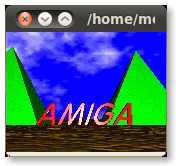


That’s the amigaball.cdxl sample available in the repository. The sample is 3835910 bytes large and plays for about 24 seconds. This yields a data rate of about 159 kbytes/second. So, yeah, single-speed CD-ROM FMV.
Pushing Projects to Github

I finally got around to importing some old projects into my Github account. I guess it’s good to have a backup out there in the cloud.

GhettoRSS
https://github.com/multimediamike/GhettoRSS
I describe this as a true offline RSS reader. Technically, it’s arguably not a true offline RSS reader. Rather, it does what most people actually want an offline RSS reader to do.

I wrote this about 2 years ago when I had a long daily train ride with a disconnected netbook. I quickly learned that I couldn’t count on offline RSS readers simply because most RSS feeds to not contain much meat. Thus, I created a program that follows URLs in RSS feeds, downloads web pages and supporting images and CSS files, and caches them in an offline database which can be read via a local web browser.

I wrote more information about this little project 2 years ago (here is part 1 and here is part 2). I fixed a few bugs in preparation for posting it but I probably won’t work on this anymore since I don’t have any use for it (the commute is long gone, but I didn’t even use it when I was commuting because I decided I just didn’t care enough to read the feeds on the train).

xbfuse
https://github.com/multimediamike/xbfuse
This is a FUSE module for mounting Xbox/360 optical disc filesystems. Here is when I first discussed it. The tool has had its own little homepage for a long time. This tool has seen some development, as I learned from Googling for “xbfuse”. Regrettably, no one who has modified the tool has ever contacted me about it (at least, not that I can recall). This is unfortunate because the patches I have seen floating around which fix my xbfuse for various installations usually boil down replacing many occurrences of an include path in the autotool-generated build system. There is probably a simpler, cleaner fix.

gcfuse
https://github.com/multimediamike/gcfuse
Written prior to xbfuse, this is a FUSE module for mounting GameCube optical disc filesystems. I first discussed this here and here. This tool has not seen too much direct development although someone eventually used it as the basis for WiiFuse which, as you can predict, mounts optical disc filesystems from Nintendo Wii games.

Origin Crusader Media

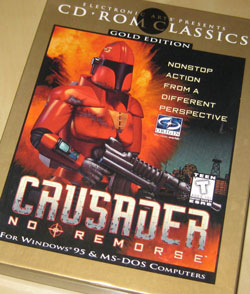
A gleaming copy of the old Origin game Crusader: No Remorse showed up today:


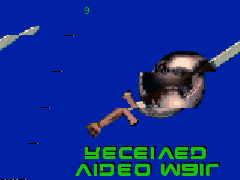
Immediately, I delved in expecting to find Xan-encoded AVI files that would play perfectly using FFmpeg/Libav. Instead, I found a directory labeled flics/ that indeed has a lot of AVI files, but not in Xan. The programs attempt to interpret them as raw RGB. The strangest thing is the first frame often looks correct, if upside down:


The first file I peered inside had the video FourCC ‘RRV1’. Searching for this led me to this discussion forum where people have already been hacking on this very format (Origin games invariably get a heap of lasting love). The forum participants have observed that 3 codecs are in play in this flics/ directory, including ‘RRV1’, ‘RRV2’, and ‘JYV1’, which apparently correspond to the initials of certain developers. The reason that the programs identify the files as raw RGB is because the FourCCs don’t appear everywhere that they’re supposed to. Additionally, there are several trailers for other Origin/EA games stored in Cinepak format elsewhere on the disc.

It seems that I’m the person who added this title to the Xan wiki page, obviously with no first-hand evidence to back it up. Meanwhile, the forum participants speculate that the files are descended from the old Autodesk FLIC format (which would explain why they live in a directory called flics/). Corroborating strings extracted from the CRUSADER.EXE file include “FlicWait”, “FlicPlayer”, “Flic %s not found.”, “flicpath”, and “FLICPLAY.C”.

The disc also features a sound/ directory which contains AMF files. Suxen Drol already documented these on the wiki as Asylum Media Format files. The disc contains an ASYLUM.DLL file as well as a utility called MOD2AMF.EXE. The latter works beautifully on a random MOD file I had laying around. The AMF file is a bit larger.

See Also:

How Many Default Languages?

I was thinking back to my childhood, when my family first owned a computer. It was an MS-DOS-powered IBM PC. The default OS came with 2 programming environments, such as they were: GW-BASIC and batch files. It was a start, I suppose. I guess most any microcomputer you can name from that era came with some kind of BASIC interpreter. That defined the computer’s “out of the box” programmability.

Then I started wondering how this compares to computers (operating systems/distributions, really) these days. So I installed a fresh version of the latest Ubuntu Linux version (11.10 as of this writing; x86_32) and looked for programmability (without installing anything else). This is what I came up with:

  1. gcc/C (only the C compiler; other components of the GNU compiler collection are installed separately)
  2. Perl
  3. Python
  4. C#, as furnished by Mono
  5. Bash — can’t forget about the shell as a full-featured programming language (sh is also present, but not t/csh)
  6. JavaScript — since Firefox is installed per default, JS counts
  7. GNU Assember — thanks to Reimar for the reminder that if gcc is present, gas necessarily needs to be there as well

I checked on C++, Objective C, Java, Ada, Fortran, Go, Lua, Ruby, Tcl, PHP, R and other languages I could think of, but the above items were the only ones present by default. At the same time, I checked my Mac OS X (10.6) box and it also has Ruby and PHP installed. It has a bunch of other languages, courtesy of Xcode, so I can’t certify anything about its out of the box programmability.

Still, I think “embarrassment of riches” pretty well sums it up. I try not to be crotchety old fogey complaining that kids these days don’t know how good they have it; rather, I’m genuinely excited for anyone who wants to leap into computer programming in this day and age.